
Garden afternoon
Together with their families
Clara & James
invite you to celebrate their wedding
Saturday, May 23 · 4:30 PM
Willowmere Gardens · Sonoma County
Dinner & dancing to follow
Watercolor olive branches, small blue flowers and blush blooms climbing both sides of a fine gold arch — a garden wedding invitation with a likeness of the two of you, drawn from one photo, framed inside it.
Make yours in the Inviti AI app for iPhone.

Point your iPhone camera at the code, then tap the link to open Inviti AI in the App Store.
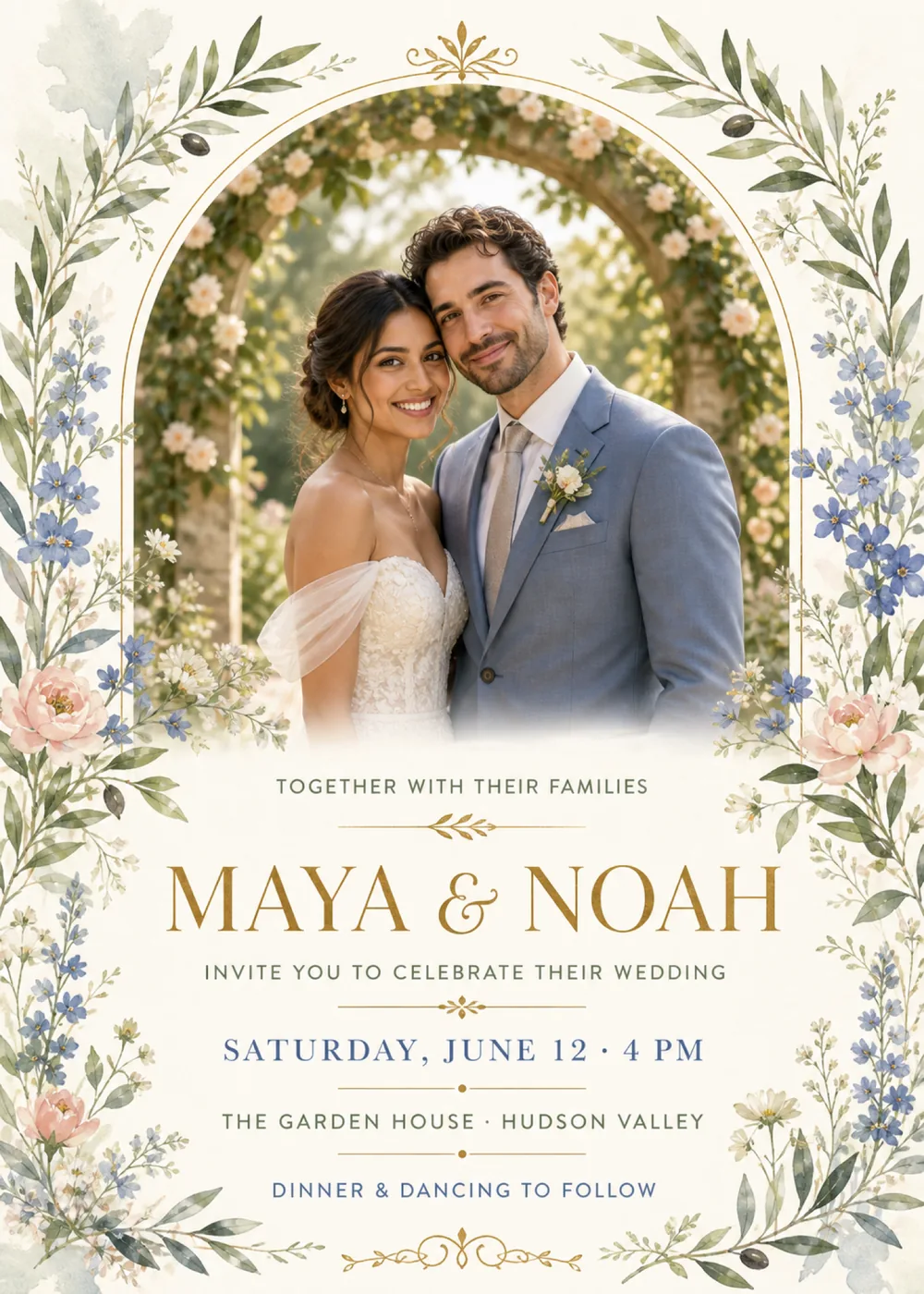
A tall, round-topped window traced in a fine gold line takes up the top half of the ivory card, with a small gold leaf-and-scroll ornament at its peak. In the sample it opens onto a sunlit garden, where a couple stand with their heads leaning together in front of a stone arch covered in cream roses, so the photo holds an arch of its own inside the drawn one; she wears an off-the-shoulder lace gown and he a dusty-blue suit with a rose boutonniere. The portrait has no hard bottom edge and fades softly into the paper just above the wording. Watercolor botanicals run the full height of both sides: sage-green olive branches with a few dark olives, sprays of small blue five-petaled flowers, full blush blooms, cream wildflowers and fine pale sprigs, with soft blue-gray washes bleeding into the top-left and bottom-right corners.
The border is painted in loose, layered watercolor: the leaves overlap in translucent greens, the blue flowers have tiny golden centers, and the blush blooms deepen to pink at the heart and pale toward their edges, so the frame looks brushed by hand rather than printed. Inside the arch, the portrait is the one photographic element, glowing with hazy afternoon sunlight. Ivory, sage, pale blue and blush keep the card light and airy, and gold is saved for the arch, the rules, the small ornaments and the names, which makes it feel like an outdoor afternoon ceremony rather than a ballroom evening. The couple pictured is fictional: Inviti AI redraws the window with a likeness of the two people in the photo you add, keeping the gold arch, the botanicals and the layout around them.
“Together with their families” opens the text in small, widely spaced sage-gray sans-serif capitals, above a fine gold rule with a little leafy sprig at its center. “Maya & Noah” is the largest line, in classic gold serif capitals with a curling ampersand, followed by “Invite you to celebrate their wedding” in the same small capitals and a second gold rule with a tiny gold ornament. The details then change color line by line: “Saturday, June 12 · 4 PM” in dusty-blue serif capitals, “The Garden House · Hudson Valley” in sage-gray sans-serif capitals and “Dinner & dancing to follow” in blue sans-serif capitals, with a thin gold rule and a center dot between each, and a gold scroll flourish closes the card at the bottom edge.
Together with their families
Clara & James
invite you to celebrate their wedding
Saturday, May 23 · 4:30 PM
Willowmere Gardens · Sonoma County
Dinner & dancing to follow
Please join us in the garden
Elena & Samuel
as we exchange our vows
Sunday, June 7 · 3 PM
Larkspur House · Charlottesville
Supper on the lawn to follow
Together with their parents
Priya & Daniel
invite you to their wedding celebration
Saturday, September 12 · 5 PM
Briarwood Orchard · Lake Geneva
Dinner & dancing to follow
Kindly reply by August 14
Every piece below was made in this design with Inviti. Matching pieces are a Pro feature, and each one you request is a separate generation, so yours will follow this direction without being pixel-identical.


It will follow this design's direction: a likeness of the two of you, drawn from your photo, inside a round-topped gold arch, framed by watercolor olive branches, small blue flowers and blush blooms, with gold serif names and blue and sage detail lines on ivory paper. Because Inviti generates each invitation with AI from your details, the arrangement and lettering can differ from this sample.
One clear, well-lit photo of just the two of you. This design needs it, and Inviti AI won't generate the invitation without one. The couple in the sample are fictional: Inviti AI redraws the arch with the two people from your photo in their place, aiming to keep each person's recognizable features, hair and expression, and keeps the gold arch, the watercolor border and your wording in the same layout. It is a generated likeness rather than your photo set into the frame, and it shows no more than two faces, so skip pictures that include friends, children or the wedding party. Before you share, look closely at both faces and read every line of the wording, and ask for a change if something isn't right. The matching pieces are graphic only, without the portrait.
The sample ends with “Dinner & dancing to follow” instead of a reply date. If you want one printed, add an RSVP deadline to your details and check where it lands in the version Inviti generates. You can also leave it off: with Pro RSVP, guests answer from the invitation's link in their browser and every reply shows up in the app. The Garden House in the Hudson Valley is only the sample's venue, so enter your own place and town.
Yes. The invitation is designed at 5×7 inches, and the app's print preparation can lay out copies on A4 or US Letter with crop marks. For the sharpest print, generate at full resolution rather than the introductory 1K size.
With Pro you can request matching pieces such as a “Welcome to the wedding of” sign with your names and venue, a “Dinner menu” card, a “Celebrate love” sign, a milestone sign with your names, date, time and venue, a “Cards & gifts” sign, a “Wishes for” sign that asks guests to leave a note for the future, a cake topper with both names, cupcake toppers with your initials, letter banner flags with an empty photo opening, food labels such as “Lemon cake”, water bottle labels with your names and venue, “A sweet thank you” chocolate bar labels, and thank-you cards and tags with your names. Each piece is a separate generation; the full sample set is shown below.

New subscribers start with an introductory week or month that includes five designs; plans and one-time packs show Apple-localized prices in the app.