
Hold the date
Save the date
Nina & Mateo
Saturday, June 12
Saltmarsh House · Cape May
Formal invitation to follow
A watercolor sky in blue and peach that melts into a sunlit shoreline, with shells and coral tucked into the corners — a save-the-date card that puts the two of you on the beach, drawn from a single photo, months before the wedding.
Make yours in the Inviti AI app for iPhone.

Point your iPhone camera at the code, then tap the link to open Inviti AI in the App Store.
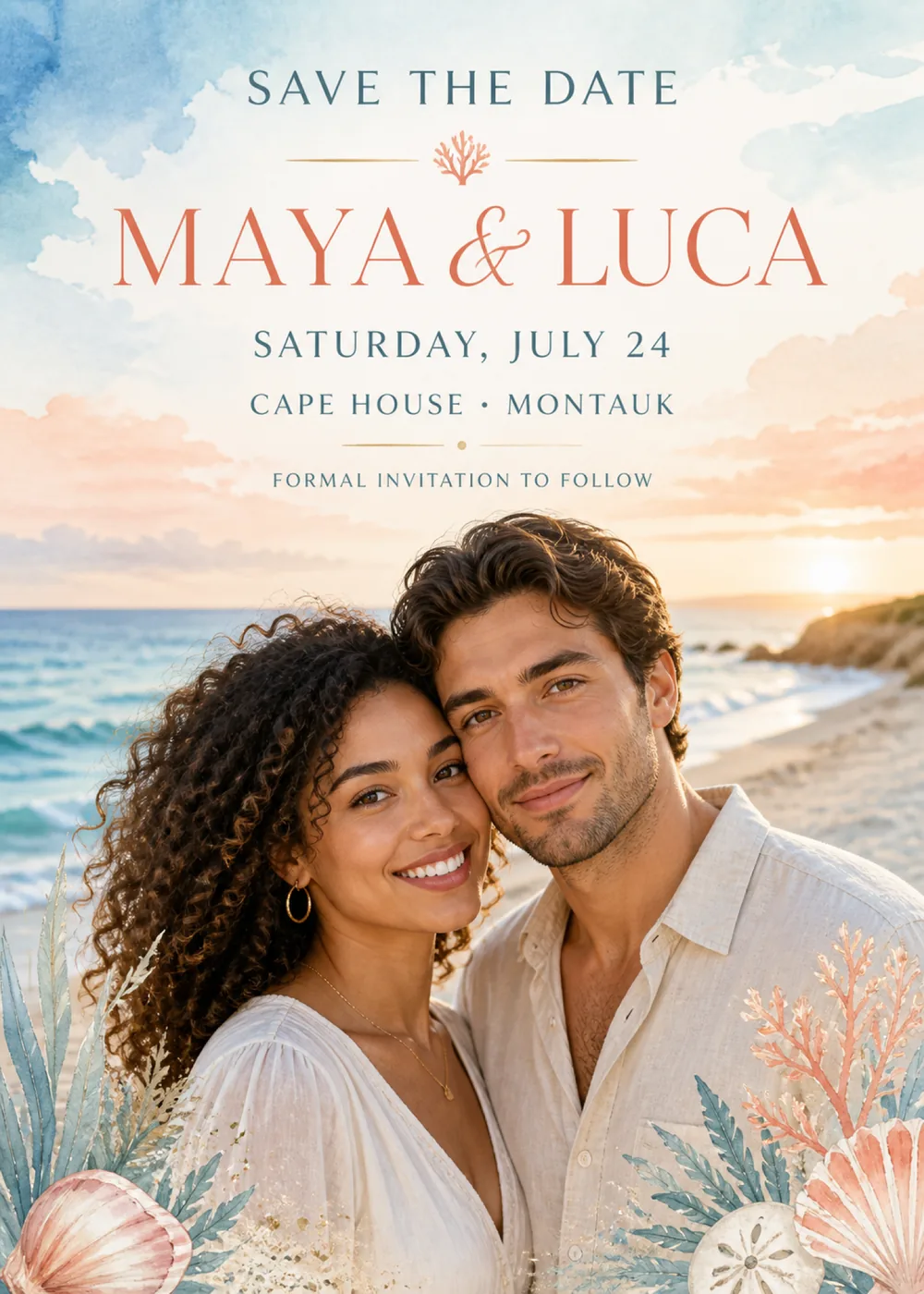
The top half of the card is open sky painted in watercolor: a deep blue wash bleeds in from the upper left corner, paler blue drifts across the upper right, and banks of peach and coral cloud gather lower down on both sides, leaving a soft cream field in the middle for the wording. A little below the last line of text the sky meets the sea, and the lower half opens onto a beach, with turquoise water breaking in white waves on the left, a curve of pale sand and a grassy headland on the right, and the sun sitting low and bright on the horizon. In front of it, the sample shows a smiling couple framed from the chest up and leaning their heads together, one in a soft white V-neck blouse, the other in an open-collared cream shirt. Painted sea life fills the bottom corners: blue-green fronds and a pink scallop shell on the left, and on the right a branch of coral, a sand dollar and another scallop shell among more fronds.
Two styles meet in the middle of the card. The sky is loose, airy watercolor, with blooms where the pigment pooled and feathered edges where it ran into the paper, and the shells, coral and fronds are brushed in the same way. The shoreline and the couple, by contrast, look photographic, warmed by the glow of the low sun, so the painted clouds and the real-looking beach blend into one golden-hour scene. Sky blue, sea teal, coral, peach and soft sand carry the whole card, which keeps it bright and summery rather than stiff or formal. This is a photo template: the couple shown is fictional, and Inviti AI redraws that spot with a likeness of the two people in the photo you add.
The wording is stacked in the cream space at the top. “Save the date” opens in widely spaced slate-teal serif capitals, followed by a pair of fine gold rules with a tiny coral sprig between them. “Maya & Luca” is the largest line by far, in tall coral serif capitals joined by a flowing script ampersand. “Saturday, July 24” and “Cape House • Montauk” come next in slate-teal serif capitals, then another pair of gold rules meeting at a small gold dot, and “Formal invitation to follow” closes the block in smaller, lighter spaced capitals. The sample gives no time and no RSVP line, because the card's only job is to fix the date and the place in guests' minds.
Save the date
Nina & Mateo
Saturday, June 12
Saltmarsh House · Cape May
Formal invitation to follow
Save the weekend
Clara & Javier
September 17–19
Harbor Point · Kennebunkport, Maine
Invitation and travel details to follow
Save the date
Hannah & Sam
are renewing their vows
Sunday, August 8
Seabright Pavilion · Santa Cruz
Details to follow
Every piece below was made in this design with Inviti. Matching pieces are a Pro feature, and each one you request is a separate generation, so yours will follow this direction without being pixel-identical.


It will follow this design's direction: a blue, peach and coral watercolor sky above a sunlit shoreline, a generated likeness of the two of you in front of the sea, painted shells, coral and fronds in the lower corners, and coral serif names with slate-teal details at the top. Because Inviti generates each invitation with AI from your details, the arrangement and lettering can differ from this sample.
One clear, well-lit photo of just the two of you; this design won't generate without it. The couple in the sample is fictional. Inviti AI redraws the card with the two people from your photo in their place, aiming to keep your recognizable features, hair and expressions, while the layout and your wording stay as they are. What you get is a generated likeness, not your photo pasted onto the beach, and it shows no more than two faces, so skip group shots or pictures with other people in the background. Before you send it, look closely at both faces and read every line of the wording, and ask for a change if anything is off. The matching pieces are graphics only, with no portrait.
It is laid out as a save the date. The sample gives only the names, the date and the venue with its town, then closes with “Formal invitation to follow”, which is all guests need months ahead to block the day and plan travel. Cape House in Montauk is only the sample's venue, and you can replace the closing line with your own, such as “Invitation and travel details to follow”. Proofread the date carefully in your generated card, since guests will copy it straight into their calendars. The matching pieces carry the same coastal style through to the wedding day itself.
Yes. The invitation is designed at 5×7 inches, and the app's print preparation can lay out copies on A4 or US Letter with crop marks. For the sharpest print, generate at full resolution rather than the introductory 1K size.
With Pro you can request matching pieces such as a “Welcome to the wedding of” sign with your names and venue, a “Dinner menu” card, a milestone sign with your names, date and venue, a “Celebrate love” sign, a “Cards & gifts” sign, a “Wishes for” sign asking guests to leave a note for the future, a cake topper with both names, cupcake toppers with your initials, banner flags with your initials and an empty photo opening, food labels such as “Lemon cake”, water bottle labels with your names and venue, “A sweet thank you” chocolate bar labels, and “Thank you” cards and tags, all in the same watercolor style without the portrait. Each piece is a separate generation; the full sample set is shown below.

New subscribers start with an introductory week or month that includes five designs; plans and one-time packs show Apple-localized prices in the app.