
The next chapter
The next chapter
Celebrating Dr. Raymond Whitaker
Friday, June 11 · 6 PM
The Lantern Wharf · Portland
Dinner, stories & toasts
RSVP by May 28
A harbor skyline at sunrise, a watercolor world map traced with a dashed coral route and two blank luggage tags — a retirement invitation that sets a likeness of the retiree, drawn from one photo, beside “The Next Chapter” in tall navy capitals.
Make yours in the Inviti AI app for iPhone.

Point your iPhone camera at the code, then tap the link to open Inviti AI in the App Store.
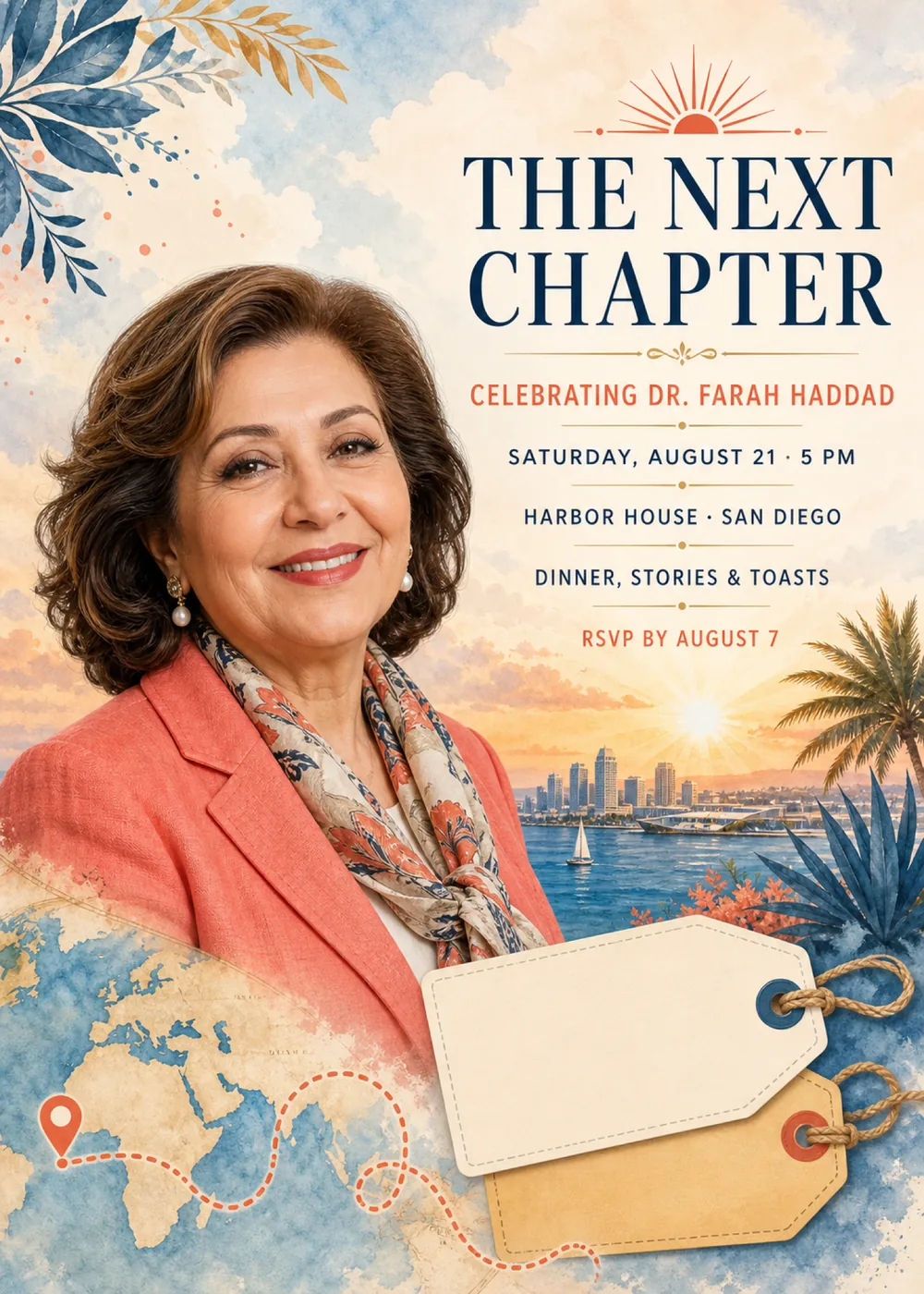
The portrait takes up the left half of the card. In the sample, a smiling woman with shoulder-length brown waves faces the viewer in a coral blazer, a cream, coral and navy patterned silk scarf knotted at the neck and pearl drop earrings, with no frame around her. The wording stacks in a narrow centered column on the right, under a small coral sunburst, and behind it the sky opens onto a harbor: a row of towers along the waterline, a white sailboat on blue water and the sun sitting low and bright above the far shore, with a palm tree at the right edge and spiky blue leaves and coral blossoms at its foot. Toward the bottom of the card the blazer gives way to a watercolor world map, where a coral pin on the left starts a dashed coral route that loops across the map toward two blank luggage tags, a cream one in front of a sand-colored one, each tied on with twine through a round eyelet. Blue and gold leaves reach in from the top left corner.
Everything around the portrait is loose, sunny watercolor: a cloudy sky washed in pale blue and peach, small coral and blue paint spatters near the top left corner, tan continents on blue seas, and tags with dashed stitching around their edges, like a page from a travel sketchbook. The portrait is the one lifelike element, in soft, warm light, and instead of ending at a border its lower edge melts into the painted map. Navy, coral, harbor blue, cream and a sunrise gold carry the whole card, and in the sample the coral blazer repeats the name line and the sunburst, so the retiree and the lettering look like they were chosen together. The mood is grateful and a little adventurous, more send-off on a sunny dock than formal banquet. The woman shown is fictional: your version shows a generated likeness of the person in your photo in her place, with a single face on the card, and the matching pieces are drawn in the same watercolor style without any portrait.
“The Next Chapter” is the largest wording on the card, broken over two lines in crisp, high-contrast navy serif capitals just beneath the sunburst. A fine gold rule with a small scrolled ornament at its center leads to “Celebrating Dr. Farah Haddad” in widely spaced coral sans-serif capitals. The details follow in smaller navy sans-serif capitals, each line set off by a short gold rule with a dot at its middle: “Saturday, August 21 · 5 PM”, “Harbor House · San Diego” and “Dinner, stories & toasts”, and then “RSVP by August 7” in coral closes the column just above the skyline.
The next chapter
Celebrating Dr. Raymond Whitaker
Friday, June 11 · 6 PM
The Lantern Wharf · Portland
Dinner, stories & toasts
RSVP by May 28
Bon voyage, Professor Ellen Marsh
Celebrating 34 years of teaching
Sunday, September 19 · 4 PM
Bayside Hall · Annapolis
Toasts, cake & travel wishes
RSVP by September 5
Here's to the next chapter
Celebrating Gloria Reyes
After 31 years of nursing
Saturday, May 15 · 5:30 PM
The Reyes home · Sacramento
Dinner, stories & a few speeches
RSVP to Ana by May 1
Every piece below was made in this design with Inviti. Matching pieces are a Pro feature, and each one you request is a separate generation, so yours will follow this direction without being pixel-identical.


It will follow this design's direction: a generated likeness of the retiree on the left, “The Next Chapter” in large navy serif capitals under a coral sunburst, the name in coral and the details in navy between gold rules, a watercolor harbor skyline at sunrise with a sailboat and a palm tree, and a world map with a dashed coral route running toward two blank luggage tags. Because Inviti generates each invitation with AI from your details, the arrangement and lettering can differ from this sample.
One clear, well-lit photo of the person retiring, with nobody else in it. This design requires a personal photo, and Inviti AI won't generate it without one. The woman in the sample is fictional: Inviti AI redraws the left side of the card with the person from your photo in her place, aiming to keep their recognizable features, hair and expression, while the harbor, the map, the tags, the layout and your wording stay as they are. The portrait is a generated likeness rather than your photo pasted onto the watercolor, and the card shows only one face, so pass over team pictures and farewell-lunch group shots and pick one where the retiree is on their own and easy to see. A head-and-shoulders or waist-up photo suits the space, and a relaxed vacation snapshot works as well as a work headshot. Check the face and read every line of wording before you share it, and ask for a change if anything looks off. The matching pieces are graphics only, without the portrait.
That design has no people and no photo. It is a flat, mid-century cut-paper poster: “The Next Chapter” is a small, widely spaced coral heading, the retiree's name is the headline in tall, condensed navy serif, and a golden sun sets over a textured blue paper horizon beside three luggage tags joined by a red string. This one turns that around. “The Next Chapter” becomes the big navy headline, the name follows in coral beneath it, and a generated likeness of the retiree from your photo fills the left side, painted into soft watercolor with a harbor skyline at sunrise, a world map with a dashed route and two blank luggage tags. Pick this one when you want the guest of honor on the card, and the other when you'd rather not use a photo at all. The two names differ by one word, so look for “Portrait” in Explore. Dr. Farah Haddad, Harbor House in San Diego and “Dinner, stories & toasts” are only this sample's details; yours replace them.
Yes. The invitation is designed at 5×7 inches, and the app's print preparation can lay out copies on A4 or US Letter with crop marks. For the sharpest print, generate at full resolution rather than the introductory 1K size.
With Pro you can request matching pieces such as a “Welcome” sign with “The next chapter” and the retiree's name, a milestone sign with “The next chapter”, the name and the date, a “Dinner menu” card (the sample lists garden greens, roasted vegetables, citrus cake, and tea and coffee), a “Cards & gifts” sign, a “Please sign our guest book” sign, a “Notes for” sign with the retiree's name, a “The next chapter” cake topper with the name, cupcake toppers with the retiree's initial, a banner flag with the initial and an empty photo opening, food labels such as “Citrus cake”, water bottle labels with “The next chapter” and the name, “A sweet thank you” chocolate bar labels, and “Thank you” cards and tags with the retiree's name, all drawn as graphics without the portrait. Each piece is a separate generation; the full sample set is shown below.

New subscribers start with an introductory week or month that includes five designs; plans and one-time packs show Apple-localized prices in the app.