
Chapter 21
Chapter 21
Celebrate Elena
Friday, March 12 · 7:30 PM
The Foundry Loft · Chicago
Dinner · Music · Dancing
RSVP by February 26
A flash-lit portrait stepping out of a black background, with gold leaf brushed across two corners and the name in tall gold capitals — an after-dark invitation that opens chapter twenty-one with the birthday person's likeness, drawn from your photo, front and center.
Make yours in the Inviti AI app for iPhone.

Point your iPhone camera at the code, then tap the link to open Inviti AI in the App Store.
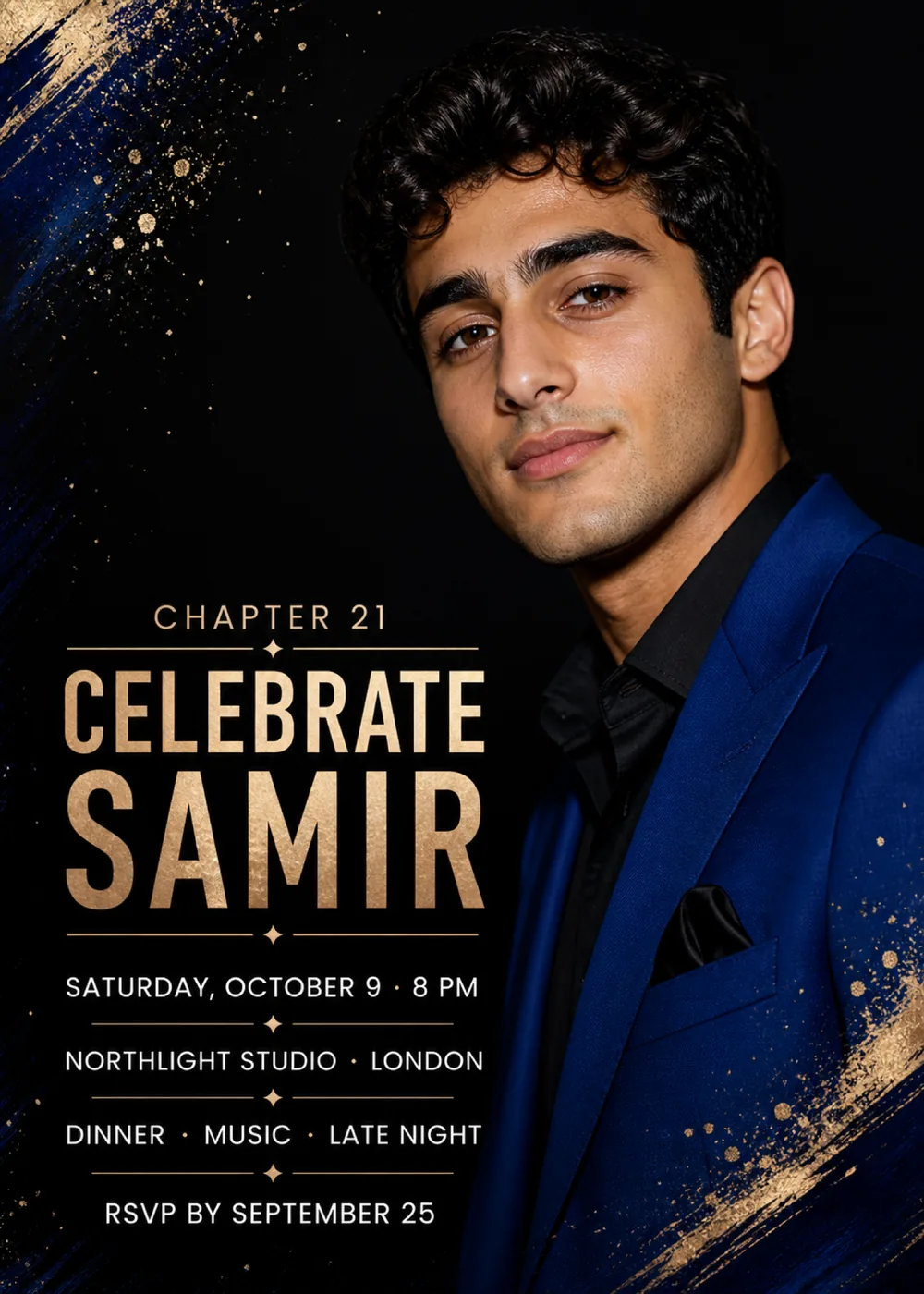
The card is a black field split between a column of lettering on the left and a large portrait on the right. In the sample, a fictional young man in a royal-blue suit jacket over an open-collared black shirt, a black pocket square in his breast pocket, is shown from the chest up with his head tilted slightly and a small smile, and his shoulder runs off the right and bottom edges. Navy dry-brush streaks slant down the left edge from the top corner, where they break into strokes of gold leaf and a spray of gold flecks and dots drifting in toward the middle of the card; a second sweep of gold leaf and dark blue crosses the lower right corner over the jacket, with more gold dots scattered above it. The text fills the lower half of the left side, from “Chapter 21” down to the RSVP line, with a thin gold rule and a small star marking each break.
The portrait has the look of a flash photograph taken at night: bright, direct light catches the face, the hair and the sheen of the jacket, and everything behind drops away into flat black, so the person seems to step forward out of the dark. Around that photographic center the decoration is painterly and metallic, with crinkled, uneven gold leaf, scratchy dry strokes of navy and flecks that look flicked from a loaded brush. Only black, navy, champagne gold and cream are in play, which keeps the card restrained and dressed up, more premiere-night poster than balloons and confetti. The man shown is a stand-in: Inviti AI draws a likeness of the person in your photo in his place, with no more than one face, while the matching pieces stay graphic only and the letter pennants leave an empty photo opening.
“Chapter 21” opens the column in small, widely tracked sans-serif capitals in champagne gold. “Celebrate Samir” follows on two lines in tall, condensed sans-serif capitals with a crumpled gold-leaf texture, “Samir” set even larger than “Celebrate” so the name is the boldest thing on the left, with a gold rule above and below. The details are set one to a line in clean cream sans-serif capitals, “Saturday, October 9 · 8 PM”, “Northlight Studio · London”, “Dinner · Music · Late Night” and “RSVP by September 25”, each parted from the next by a short gold rule with a tiny four-pointed star at its center.
Chapter 21
Celebrate Elena
Friday, March 12 · 7:30 PM
The Foundry Loft · Chicago
Dinner · Music · Dancing
RSVP by February 26
Chapter 21
Join us for Marcus
Saturday, May 22 · 7 PM
The Wren Room · Atlanta
Dinner with family and friends
RSVP by May 8
Chapter 30
Celebrate Priya
Saturday, September 18 · 8 PM
Harbor Street Studio · Seattle
Dinner · Dessert · Late night
RSVP by September 4
Every piece below was made in this design with Inviti. Matching pieces are a Pro feature, and each one you request is a separate generation, so yours will follow this direction without being pixel-identical.


It will follow this design's direction: a flash-lit portrait drawn from your photo against a black background, navy and gold-leaf brushstrokes with gold flecks in two corners, “Chapter 21” and the name in tall gold capitals, and cream details between thin gold rules with small stars. Because Inviti generates each invitation with AI from your details, the arrangement and lettering can differ from this sample.
This design needs one personal photo of the guest of honor, and Inviti AI won't generate it without one. The young man in the sample is fictional: from your picture, Inviti AI redraws the portrait side of the card with the person in your photo in his place, aiming to keep their recognizable features, hair and expression, and keeps the layout and wording around them. The result is a generated likeness rather than your photo dropped in, and it shows at most one face, so choose a clear, well-lit photo of just the birthday person. Before you send it, study the face and read every line of the wording, and ask for a change if anything is off. The matching pieces are graphic only, with no portrait.
Yes. The age appears only in the small “Chapter 21” line above the name; the portrait, gold leaf and flecks carry no number, so “Chapter 18” or “Chapter 30” works the same way. “Dinner · Music · Late Night” is just the sample's outline of the evening, and Northlight Studio in London is only its venue, so enter your own plan and place, such as “Dinner · Dancing · Cake” at a loft in your city. Read those smaller lines closely in the generated version before you share it, since they are the easiest to skim past.
Yes. The invitation is designed at 5×7 inches, and the app's print preparation can lay out copies on A4 or US Letter with crop marks. Dark designs print best on matte paper; generate at full resolution rather than the introductory 1K size.
With Pro you can request matching pieces such as a “Party menu” card, a welcome sign with “Samir turns 21” and the venue, a “Let's celebrate” sign, a milestone sign with the name, age, date, time and venue, a “Cards & gifts” sign, a “Wishes for Samir” sign that invites guests to leave a note for the future, a “Samir turns 21” cake topper, initial cupcake toppers, letter pennants with an empty photo opening, food labels such as “Cupcakes”, water bottle labels with the name and venue, “Chapter 21” chocolate bar labels, “Thank you for celebrating Samir” cards and “Thank you” tags, none of them repeating the portrait. Each piece is a separate generation; the full sample set is shown below.

New subscribers start with an introductory week or month that includes five designs; plans and one-time packs show Apple-localized prices in the app.