
Thirty, boldly
Thirty, boldly
The Maya issue
Saturday, March 20 · 8 PM
The Copper Loft · Chicago
Dinner & dancing
A towering serif headline, a red circle and streaks of cobalt brushwork around a cover portrait drawn from your photo — a magazine-cover invitation that makes the guest of honor the cover star of their thirtieth.
Make yours in the Inviti AI app for iPhone.

Point your iPhone camera at the code, then tap the link to open Inviti AI in the App Store.
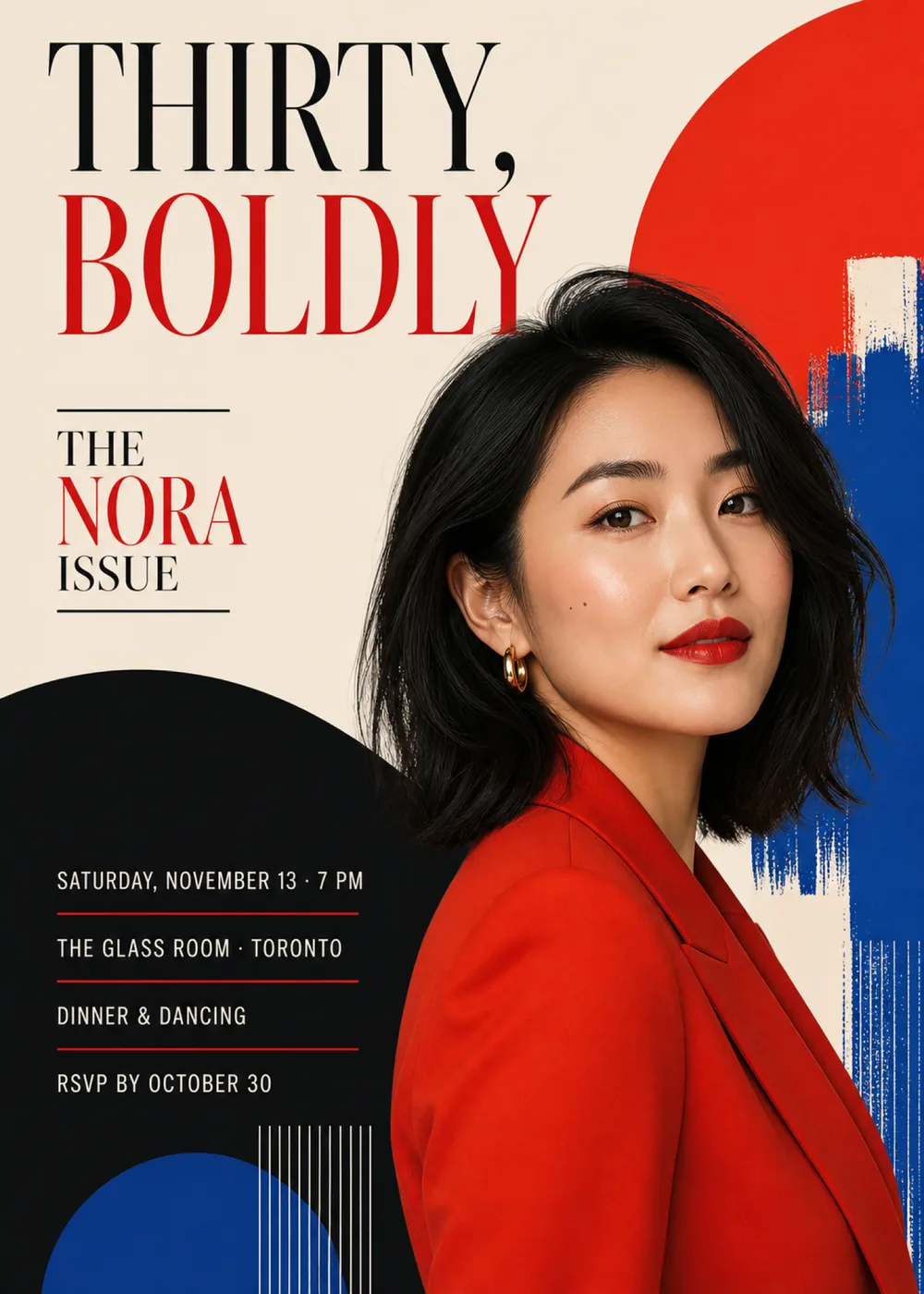
The card is arranged like the front of a fashion magazine. “Thirty, Boldly” fills the upper left in two huge lines, and below it, between two short black rules, “The Nora Issue” sits where a cover line would. The right side belongs to the portrait: in the sample, a woman with a dark shoulder-length bob, a gold hoop earring and a red blazer stands with her body angled away and her face turned to the camera, her head set against a large red circle cropped by the top and right edges of the card. Rough cobalt brushstrokes run down the right edge behind her shoulder and give way to fine vertical lines near the bottom corner. In the lower left, a big black shape with a rounded top rises from the bottom edge and slips behind the portrait, holding the party details, with a cobalt circle cut off by the bottom edge and a cluster of thin white lines at its foot.
The look pairs a studio portrait with flat, mid-century poster graphics: solid circles and blocks of color with clean edges, dry-brush cobalt strokes that show their bristle marks, and finely ruled lines, all on a plain warm cream ground. The palette stops at four colors, cream, a strong red, cobalt and near-black, and the red repeats on purpose in the headline, the name, the rules between the details and, in the sample, the blazer, so the photo and the graphics read as one piece of art direction. The portrait is lit evenly and softly, like a cover shoot. The woman shown is a fictional sample; your version puts a generated likeness of the guest of honor, drawn from the photo you add, in that spot, with one face only.
“Thirty,” is set in very tall, condensed high-contrast serif capitals in black, with hairline serifs and heavy upright strokes, and “Boldly” repeats the same lettering in red directly beneath it, so the two words stack into the largest type on the cover. “The Nora Issue” is stacked in three short lines, “The” and “Issue” in small black serif capitals and “Nora” larger in red. On the black shape, plain white sans-serif capitals list “Saturday, November 13 · 7 PM”, “The Glass Room · Toronto”, “Dinner & Dancing” and “RSVP by October 30”, with a thin red rule dividing each line from the next.
Thirty, boldly
The Maya issue
Saturday, March 20 · 8 PM
The Copper Loft · Chicago
Dinner & dancing
Cover story: thirty
The Daniel issue
Friday, June 4 · 7:30 PM
Fenwick Rooftop · Brooklyn
Cocktails, dinner & a toast
Forty, boldly
The Simone issue
Saturday, September 25 · 7 PM
The Marlowe Room · Atlanta
Dinner, toasts & dancing
Every piece below was made in this design with Inviti. Matching pieces are a Pro feature, and each one you request is a separate generation, so yours will follow this direction without being pixel-identical.


It will follow this design's direction: a tall black-and-red serif headline and a “name issue” cover line on cream, a generated likeness of the guest of honor from your photo set against a large red circle and rough cobalt brushstrokes, and the details in white capitals with red rules on a big black curved shape. Because Inviti generates each invitation with AI from your details, the arrangement and lettering can differ from this sample.
This design needs one personal photo of the guest of honor, and Inviti AI won't generate it without one. The woman in the red blazer is a fictional sample: Inviti AI redraws the cover with the person from your photo in that spot, aiming to keep their recognizable features, hair and expression, and keeps the layout and your wording around them. The result is a generated likeness, not your photo pasted onto the page, and the cover shows at most one face, so pick a clear, well-lit photo of the birthday person alone. Before you share it, look closely at the face and read every line, and ask for a change if anything looks off. The matching pieces are graphic designs without the portrait.
Yes. The age is spelled out only in the headline, and the name lives inside “The Nora issue”; the circles, brushstrokes and ruled lines carry no number. Enter something like “Forty, boldly” and “The Simone issue” with the rest of your details. The headline is the biggest type on the cover, so check it letter by letter in the version Inviti generates. The Glass Room in Toronto is only the sample's venue; a restaurant, bar, loft or your own home works just as well.
Yes. The invitation is designed at 5×7 inches, and the app's print preparation can lay out copies on A4 or US Letter with crop marks. For the sharpest print, generate at full resolution rather than the introductory 1K size.
With Pro you can request matching pieces such as a “Party menu” card, a welcome sign with “Nora turns 30” and the venue, a milestone sign with the name, date, time and venue, a “Let's celebrate” sign, a “Cards & gifts” sign, a “Wishes for Nora” sign that asks guests to leave a note for the future, a “Nora turns 30” cake topper, initial cupcake toppers, letter pennants with an empty photo opening, food labels such as “Chocolate cake”, water bottle labels with the name and venue, “Thirty, boldly” chocolate bar labels, thank-you cards “for celebrating Nora” and “Nora turns 30” thank-you tags, all drawn as graphics without the portrait. Each piece is a separate generation; the full sample set is shown below.

New subscribers start with an introductory week or month that includes five designs; plans and one-time packs show Apple-localized prices in the app.