
Little star
A little star turns four
Celebrate Noah
Sunday, June 14 · 2 PM
Starlight Party Room · Columbus
RSVP by May 31
A sleepy golden crescent, scattered stars and soft peach and blue clouds around a gold portrait arch — a bedtime-story invitation that draws your own little star into the night sky.
Make yours in the Inviti AI app for iPhone.

Point your iPhone camera at the code, then tap the link to open Inviti AI in the App Store.
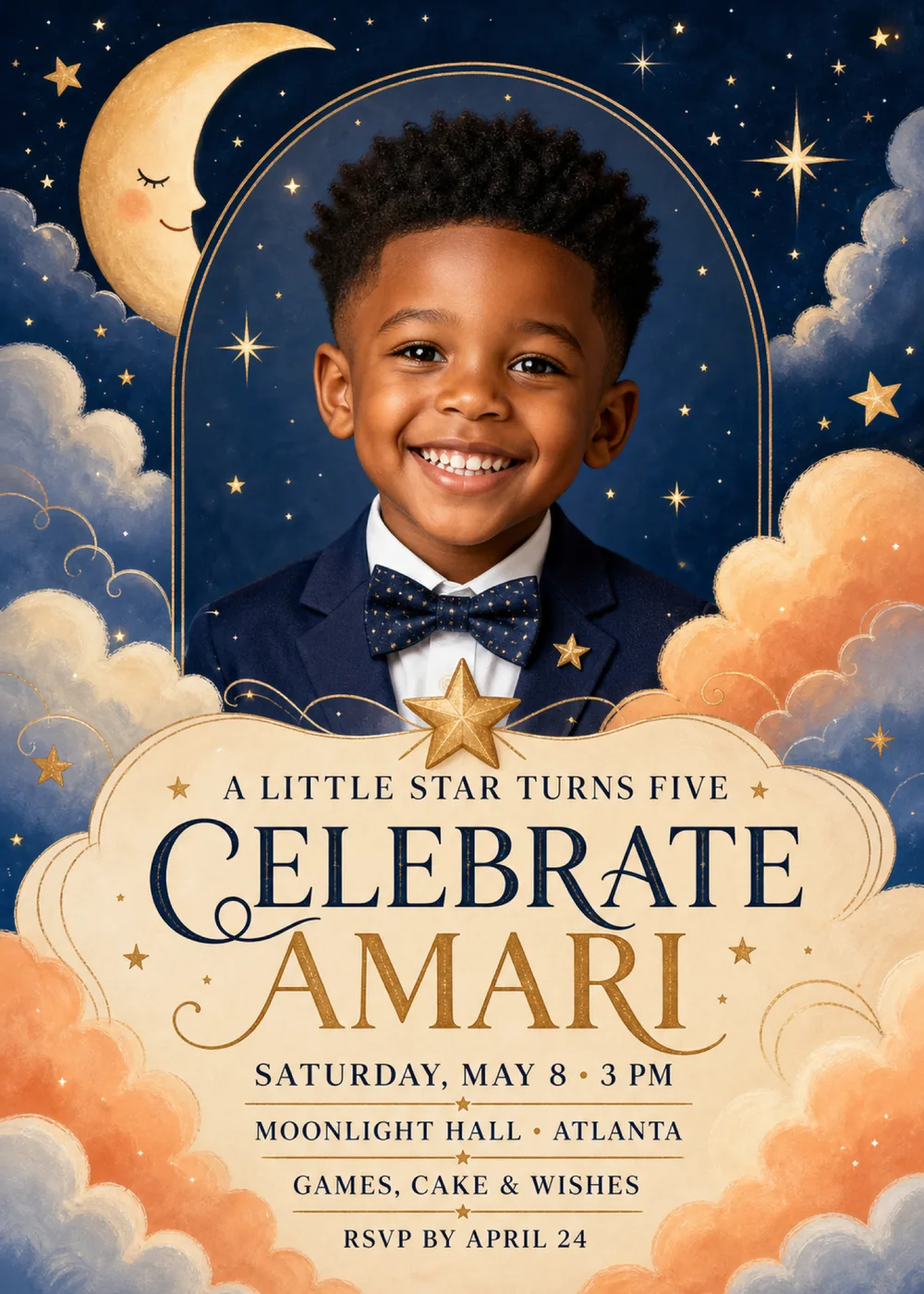
A fine double gold line rises in a tall arch through the middle of a midnight-blue sky and frames the portrait: in the sample, a smiling child in a navy jacket and bow tie, seen from the chest up against a patch of night sprinkled with tiny stars. A pale gold crescent moon leans in at the top left with its eye closed, a pink cheek and a small smile, and gold stars of every size are scattered across the sky, from pinpricks to a long-rayed sparkle at the upper right. Billowing clouds crowd both sides, dusty blue toward the top and warm peach lower down, with thin gold swirls curling through them. At the foot of the arch, a gold star sits on the top edge of a large cream panel with soft, scalloped, cloud-like edges and a fine gold outline, and that panel holds every line of text, with more peach and blue clouds gathered around its lower corners.
It is painted like a picture-book bedtime scene: the clouds are chalky and soft-edged with visible brush texture, the moon has a powdery glow, and gold glints from the stars, swirls and outlines, with tiny gold sparkles dusted over the clouds and the panel. Deep midnight navy fills most of the sky, while the gold crescent, peach and dusty-blue clouds and the cream panel warm it up, so the card feels dreamy and cozy rather than dark. The portrait is the one lifelike element, smooth and realistic against all that soft painting. This is a photo template: the child in the sample is fictional, and Inviti AI redraws the arch with the person from your photo in the sample child's place.
“A little star turns five” runs across the top of the panel in small, widely spaced navy serif capitals, set between two tiny gold stars. “Celebrate Amari” is the largest text on the card: “Celebrate” in tall navy display serif capitals with a long swash curling out of the C, and the name below it in matching gold capitals edged by thin gold flourishes. The details follow in navy serif capitals — “Saturday, May 8 · 3 PM”, “Moonlight Hall · Atlanta”, “Games, cake & wishes” and “RSVP by April 24” — each separated from the next by a fine gold rule with a small gold star at its center.
A little star turns four
Celebrate Noah
Sunday, June 14 · 2 PM
Starlight Party Room · Columbus
RSVP by May 31
Our little star turns one
Celebrate Lucia
Saturday, September 19 · 11 AM
The Hartley home, 42 Birch Lane
Shine bright, little star
Theo turns six
Friday, November 6 · 5–7:30 PM
Pajamas, stories, cake & wishes
Every piece below was made in this design with Inviti. Matching pieces are a Pro feature, and each one you request is a separate generation, so yours will follow this direction without being pixel-identical.


It will follow this design's direction: a likeness of your child drawn inside a fine gold arch on a starry midnight-blue sky, a sleepy golden crescent moon, dusty-blue and peach clouds with gold swirls, and navy and gold lettering in a cloud-edged cream panel topped by a gold star. Because Inviti generates each invitation with AI from your details, the arrangement and lettering can differ from this sample.
This design needs one personal photo; Inviti AI will not create it without one. The child in the sample is fictional. Inviti AI redraws the invitation with the person from your photo in that spot inside the gold arch, aiming to keep their recognizable features, hair and expression, while the moon, stars, clouds and cream panel keep the same layout. The result is a generated likeness, not your photo pasted in, and it shows at most one face, so choose a clear, well-lit photo of just one person. Look closely at the face and every line of wording before you share it, and ask for a change if anything is off. The matching pieces are graphic only, with no portrait.
Yes. Five appears only in the line “A little star turns five”; the moon, stars, clouds and arch carry no number, so “A little star turns one” or “A little star turns three” fits the same spot. Moonlight Hall in Atlanta is only the sample's venue and “Games, cake & wishes” is a sample line, so enter your own place and plans along with the age, and read that top line in your generated version before you share it.
Yes. The invitation is designed at 5×7 inches, and the app's print preparation can lay out copies on A4 or US Letter with crop marks. Dark designs print best on matte paper; generate at full resolution rather than the introductory 1K size.
With Pro you can request matching pieces such as a party menu, a welcome sign that repeats “A little star turns five” with the venue, a “Let's celebrate” sign with the name, a milestone sign with the name, date, time and venue, a cards and gifts sign, a “Wishes for” sign that asks guests to write a note for the years ahead, a cake topper with the name and age, initial cupcake toppers, letter pennants with an empty photo opening, food labels, water bottle labels, chocolate bar labels, thank-you cards with the name and “Thank you for celebrating” tags. Each piece is a separate generation; the full sample set is shown below.

New subscribers start with an introductory week or month that includes five designs; plans and one-time packs show Apple-localized prices in the app.