
Dinner in her honor
Dinner in her honor
Celebrate Denise
50
Saturday, March 13 · 7 PM
The Ashgrove Room · Chicago
RSVP by March 1
A gold-lined arch holding the guest of honor's portrait, fine gold rays fanning from the top corners and a big gold 50 between leafy sprigs — a dressed-up fiftieth invitation that puts the birthday person's face first.
Make yours in the Inviti AI app for iPhone.

Point your iPhone camera at the code, then tap the link to open Inviti AI in the App Store.
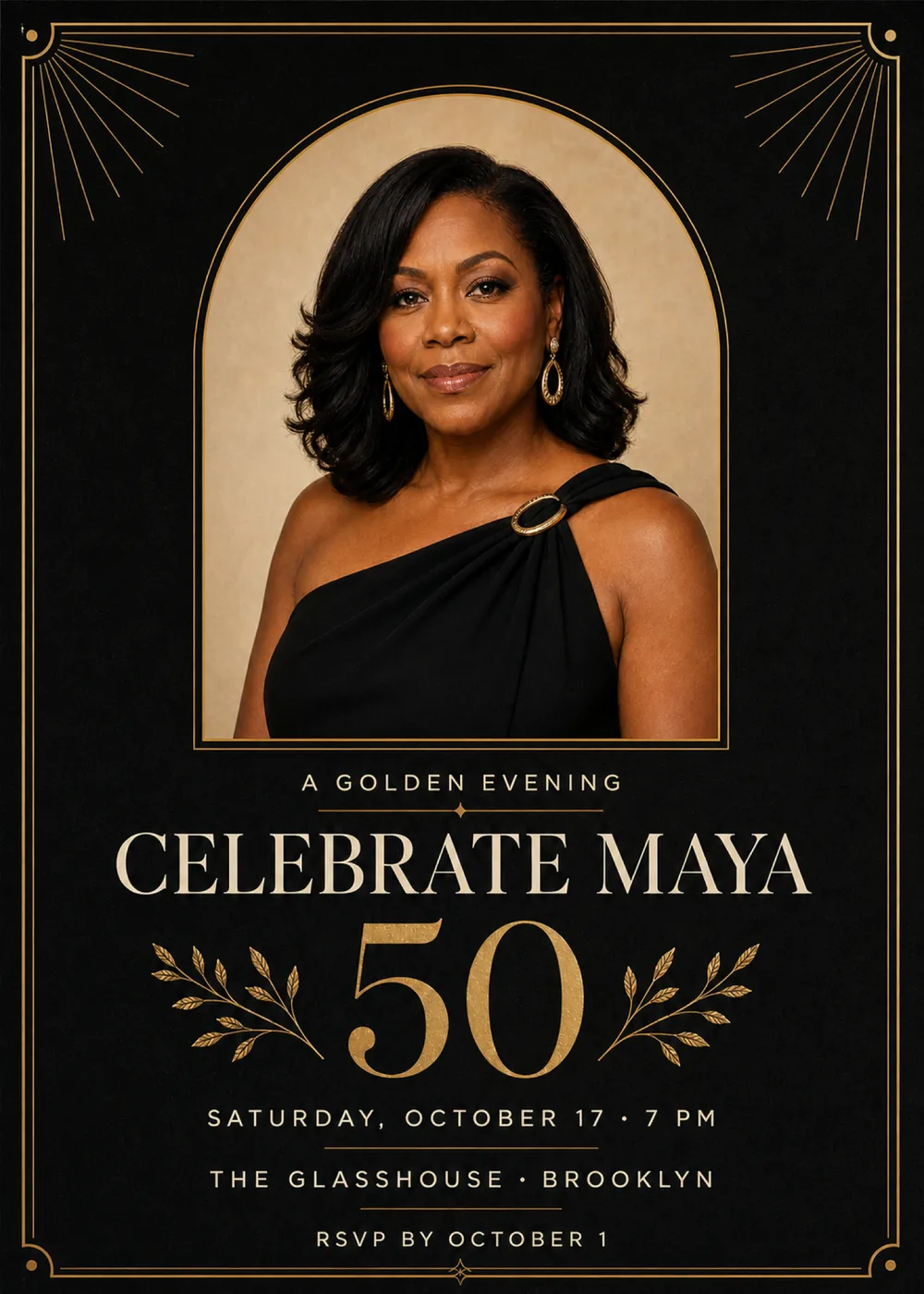
A double gold border runs around the black card, each corner cut away in a small quarter-circle that cradles a gold dot, and from the two top corners fans of hair-thin gold rays spread inward toward the center. The upper half of the card is a tall, round-topped window outlined in a fine gold line and filled with a plain warm-beige backdrop, and in the sample it holds a studio-style portrait of a woman in a black one-shoulder dress, fastened at the shoulder with an oval gold buckle, wearing gold drop earrings and facing the camera. Below the arch the text stacks in one centered column: a short opening line, a hairline gold rule marked with a small diamond, the name line stretched nearly the width of the card, and then a very large gold 50 with a leafy gold sprig curving out on each side like half of a laurel. The details close the card in three rows parted by short gold rules, and a small four-pointed star sits on the bottom edge of the border.
It pairs a formal portrait sitting with foil-like stationery: the portrait has soft, even studio light and a smooth, lifelike finish against its beige backdrop, while everything around it is flat champagne-gold line work on a black ground with a faint paper grain. The 50 and the sprigs have a speckled, brushed-metal surface, the border and rays stay fine and precise, and the corner sunbursts with the strict symmetry give the card a light Art Deco accent without heavy ornament. Outside the portrait there is only black, champagne gold, pale gold and warm cream, so the beige of the arch glows like a lit window in a dark room, and the whole card reads as an evening worth dressing for. The woman shown is a fictional sample; in your version, Inviti AI draws a likeness of the person from your photo inside the arch and keeps the gold frame, rays and lettering around them.
“A golden evening” opens the text in small, widely spaced pale-gold sans-serif capitals. “Celebrate Maya” is the widest line on the card, set in warm cream high-contrast serif capitals with sharp, fine serifs, and beneath it the “50” stands taller than any other text, in high-contrast gold serif numerals with a grainy foil texture, held between the two sprigs. The details return to spaced cream sans-serif capitals, “Saturday, October 17 · 7 PM”, “The Glasshouse · Brooklyn” and “RSVP by October 1”, with a short gold rule between each line.
Dinner in her honor
Celebrate Denise
50
Saturday, March 13 · 7 PM
The Ashgrove Room · Chicago
RSVP by March 1
Shh, it's a surprise
Celebrate Robert
50
Friday, May 7 · please arrive by 6:30 PM
Copperleaf Terrace · Atlanta
RSVP to Lena by April 24
Sixty and golden
Celebrate Angela
60
Saturday, September 25 · 6:30 PM
The Wren House · Philadelphia
RSVP by September 10
Every piece below was made in this design with Inviti. Matching pieces are a Pro feature, and each one you request is a separate generation, so yours will follow this direction without being pixel-identical.


It will follow this design's direction: a generated likeness of the guest of honor in a round-topped, gold-lined arch on black, fans of fine gold rays in the top corners, cream serif name capitals above a large gold numeral between two leafy sprigs, and the details in spaced capitals between thin gold rules inside a double gold border. Because Inviti generates each invitation with AI from your details, the arrangement and lettering can differ from this sample.
This design needs one personal photo of the guest of honor, and Inviti AI won't create it without one. The woman in the sample is fictional; in her place, Inviti AI redraws a likeness of the person in your photo inside the gold-lined arch, aiming to keep their recognizable features, hair and expression, and leaves the rays, sprigs, border, layout and your wording in place. Because the portrait is generated rather than your photo pasted in, details can differ from the original, and the arch shows at most one face, so it won't turn a couple or group photo into a shared portrait. Choose a clear, well-lit picture of the guest of honor alone with the face easy to see, then study the likeness and read each line of wording before sending it, and ask for a change if something doesn't look right. The portrait appears on the invitation alone, not on the matching pieces.
Yes. The age appears only as that large gold numeral; “A golden evening”, the sprigs, the rays and the arch carry no number. Enter 40, 60, 75 or any other age along with your other details, and because the numeral is drawn as part of the artwork, check that it reads correctly between the sprigs in your generated version. The Glasshouse in Brooklyn is only the sample's venue, so add your own restaurant, hall, rooftop or home, and give an opening line of your own if “A golden evening” doesn't suit the party.
Yes. The invitation is designed at 5×7 inches, and the app's print preparation can lay out copies on A4 or US Letter with crop marks. Dark designs print best on matte paper; generate at full resolution rather than the introductory 1K size.
With Pro you can request matching pieces such as a “Party menu” card, a welcome sign with “Maya turns 50” and the venue, a milestone sign with the name, date, time and place, a “Let's celebrate” sign, a “Cards & gifts” sign, a “Wishes for Maya” sign asking guests to leave a note for the future, a “Maya turns 50” cake topper, initial cupcake toppers, letter pennants with an empty photo opening, food labels such as “Chocolate cake”, water bottle labels with the name and venue, “A golden evening” chocolate bar labels, “Thank you for celebrating Maya” cards and “Maya turns 50” thank-you tags, none of which repeat the portrait. Each piece is a separate generation; the full sample set is shown below.

New subscribers start with an introductory week or month that includes five designs; plans and one-time packs show Apple-localized prices in the app.