
On cloud nine
On cloud nine
Celebrating Amara & Chris
Saturday, May 16 · 11 AM
The Lark Terrace · Portland
Brunch & baby wishes
RSVP by May 2
A powder-blue sky, lilac clouds and strands of pearls around a fine gold ring — a cloud nine baby shower invitation with a likeness of both parents-to-be, drawn from one photo, floating at its center.
Make yours in the Inviti AI app for iPhone.

Point your iPhone camera at the code, then tap the link to open Inviti AI in the App Store.
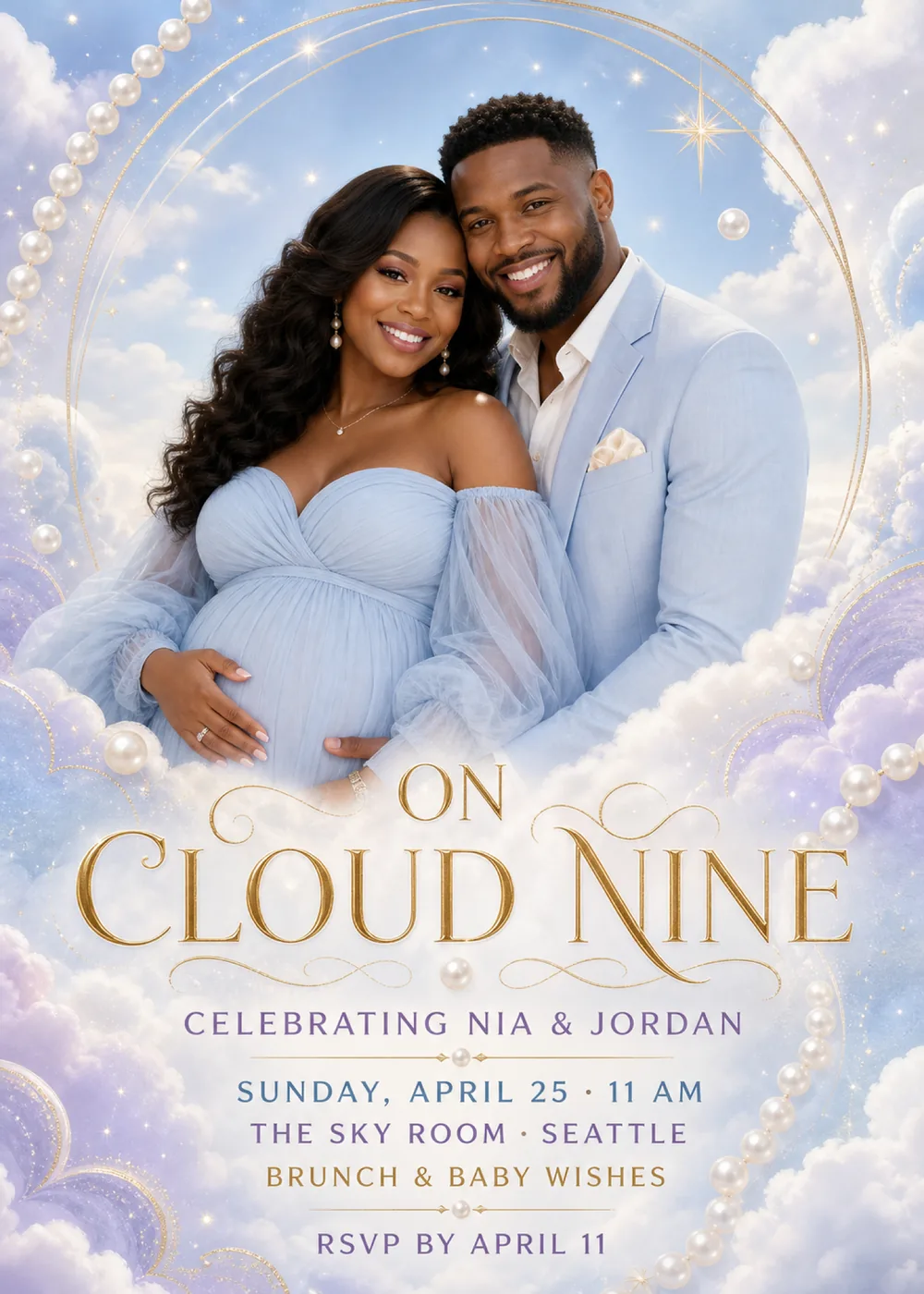
A fine gold ring, traced in two thin concentric lines, arcs around the top two-thirds of the card like a halo, and inside it the sample couple stand close against a powder-blue sky, heads tilted together and both smiling at the camera. She wears an off-the-shoulder pale blue gown with sheer, gathered sleeves and cradles her bump with both hands; he wears a pale blue suit over an open-collared white shirt. Nothing marks where the portrait ends: at the bottom it sinks into a bank of soft white cloud, and that same cloud becomes the backdrop for the lettering. Strands of pearls drape down the upper-left edge and climb the right side from the bottom corner, single pearls float in the sky and between the lines of type, a four-pointed gold star glints beside the ring at the upper right, and lilac clouds traced with glittering gold outlines billow in from both sides.
The whole card is washed in bright, even daylight, the clouds soft and lightly flecked with sparkle, while the portrait is rendered in a polished, photographic style. In the sample the couple's pale blue clothes are nearly the color of the sky, so they seem to be floating in it rather than standing in front of a backdrop. Powder blue and lilac carry most of the card, pearl white softens the clouds, and gold is kept for the ring, the star, the scrolls and the headline, so it feels dreamy and celebratory without tipping into a nursery look. The couple shown are fictional: in your version Inviti AI draws a likeness of the two people from your photo in that place, and the matching pieces bring the clouds, pearls and gold without any portrait.
“On” sits small and centered above “Cloud Nine”, both in gold serif capitals with a soft metallic sheen, the C and the first N drawn with long, sweeping strokes, while curling gold flourishes open out on either side and a single pearl hangs centered beneath them. “Celebrating Nia & Jordan” follows in widely spaced lavender-purple sans-serif capitals, then a hairline gold rule with a pearl at its middle. The details change color line by line: “Sunday, April 25 · 11 AM” in soft blue, “The Sky Room · Seattle” in purple and “Brunch & baby wishes” in gold, and a second pearl-centered rule sets off “RSVP by April 11” in purple at the foot of the card.
On cloud nine
Celebrating Amara & Chris
Saturday, May 16 · 11 AM
The Lark Terrace · Portland
Brunch & baby wishes
RSVP by May 2
Floating on cloud nine
A baby shower for Leah & Marcus
Sunday, June 7 · 10:30 AM
The Skylight Room · San Diego
Brunch, games & baby wishes
Kindly reply by May 24
Our hearts are on cloud nine
Join us in celebrating Sofia & Daniel
Sunday, September 20 · 2 PM
The Garden Loft · Minneapolis
Tea, cake & advice for the new parents
RSVP by September 6
Every piece below was made in this design with Inviti. Matching pieces are a Pro feature, and each one you request is a separate generation, so yours will follow this direction without being pixel-identical.


It will follow this design's direction: a generated likeness of the two of you inside a fine gold ring on a powder-blue sky, lilac and white clouds with glittering gold outlines, strands of pearls, and “On Cloud Nine” in gold serif capitals above details in purple, blue and gold. Because Inviti generates each invitation with AI from your details, the arrangement and lettering can differ from this sample.
One clear, well-lit photo of the expecting couple with nobody else in it. Inviti AI won't create this invitation without it. Nia and Jordan in the sample are fictional: Inviti AI redraws the space inside the gold ring with the two people from your photo in their place, aiming to keep your recognizable features, hair and expressions, while the clouds, pearls and your wording keep their layout. What you get is a generated likeness, not your photo cut out and set against the sky, and the design shows no more than two faces, so a family picture with older siblings, grandparents or friends won't work here. Look closely at both faces and read every line before you share, and ask for a change if anything looks off. The matching pieces are drawn as graphics only, without the portrait.
No. In the sample the sky and the couple's clothes are pale blue, but lilac clouds, pearl white and gold balance it, and the wording, “On cloud nine” and “Celebrating Nia & Jordan”, celebrates the parents without saying boy or girl, so it suits a girl, a boy or a surprise. If you are sharing the news, add a line such as “It's a girl” to your details and check where it lands in the version Inviti generates. “Brunch & baby wishes” and The Sky Room in Seattle are only the sample's lines; swap in your own plans and venue.
Yes. The invitation is designed at 5×7 inches, and the app's print preparation can lay out copies on A4 or US Letter with crop marks. For the sharpest print, generate at full resolution rather than the introductory 1K size.
With Pro you can request matching pieces such as a “Brunch menu” card, a “Welcome” sign with “On cloud nine” and the date, a milestone sign with “On cloud nine” and both names, a “Cards & gifts” sign, a “Wishes for baby” sign, a “Please sign our guest book” sign, an “On cloud nine” cake topper, “Baby” cupcake toppers, “Baby” pennant flags with an empty round photo opening ringed in pearls, food labels such as “Cloud cake”, water bottle labels with “On cloud nine” and the date, “A sweet thank you” chocolate bar labels, and “Thank you” cards and tags with both names, all drawn as graphics without the portrait. Each piece is a separate generation; the full sample set is shown below.

New subscribers start with an introductory week or month that includes five designs; plans and one-time packs show Apple-localized prices in the app.