
To the moon
Love you to the moon
Honoring Priya
Sunday, September 19 · 2 PM
The Starlight Room · Portland
Tea & sweet wishes
RSVP by September 5
A painted full moon, fine gold orbits and lilac clouds on a midnight-navy sky — a baby shower invitation that sets a likeness of the parent-to-be, drawn from one photo, beside the words “Love you to the moon”.
Make yours in the Inviti AI app for iPhone.

Point your iPhone camera at the code, then tap the link to open Inviti AI in the App Store.
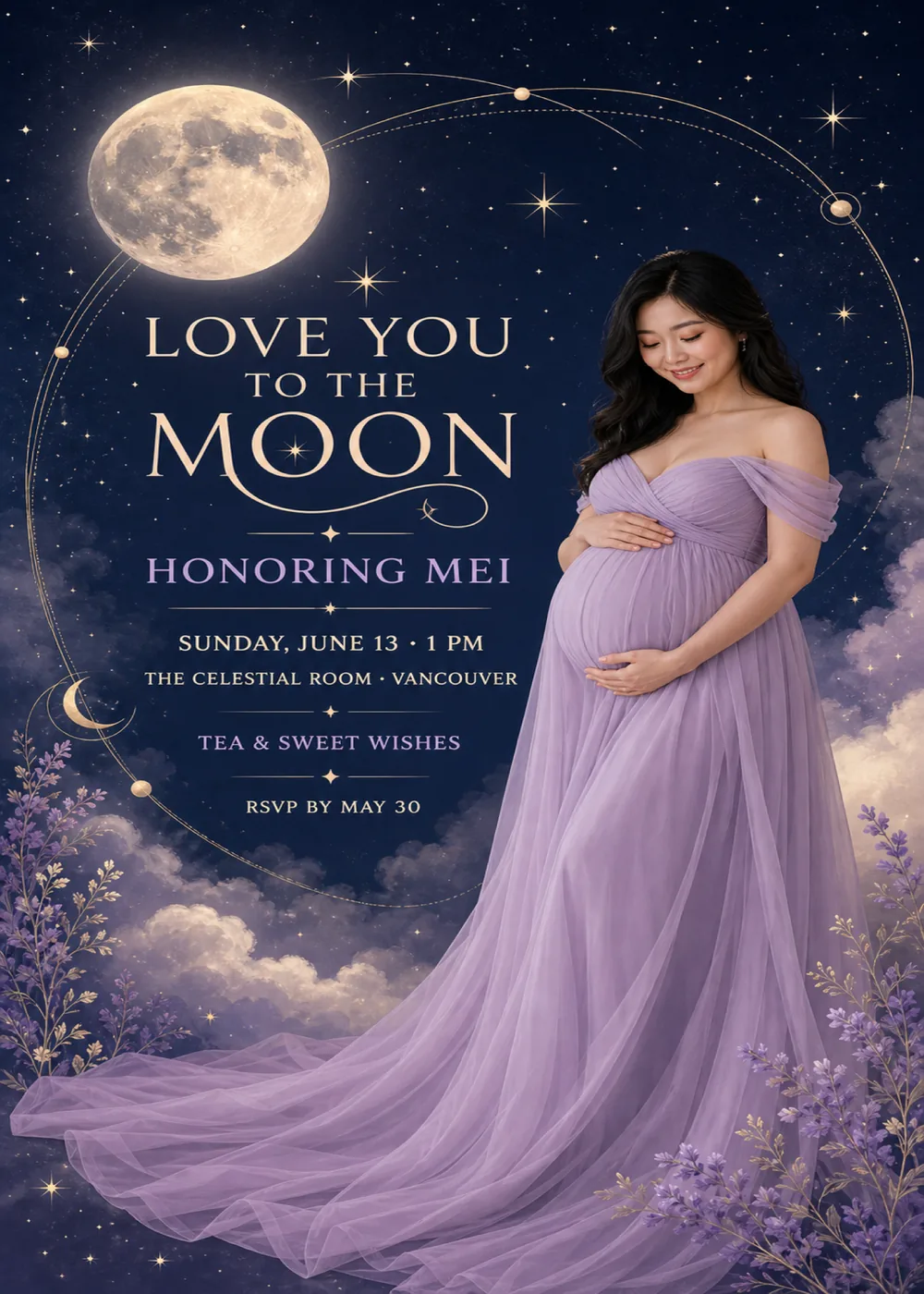
A full moon hangs in the top-left corner of a midnight-navy sky, painted with soft gray craters and a warm glow, and a fine gold orbit line loops out from it in a wide ellipse around the wording, strung with small gold spheres like planets, one of them ringed. The wording sits on the left inside that loop, and a small gold crescent moon rests on the line at the left edge. In the sample, the parent-to-be stands on the right in an off-the-shoulder lilac gown, eyes lowered and smiling, with both hands resting on the bump, and the sheer skirt spills into a long train that sweeps across the foot of the card. Mauve clouds with cream-lit edges drift in from both sides, sprigs of lavender and fine gold leaves rise from the two lower corners, and four-pointed stars and a dusting of tiny ones fill the sky.
The moon, clouds and flowers are painted in a soft, dreamy style, with a gentle glow around the moon and along the edges of the clouds, while the portrait is the one photographic element, lit warmly on the face and the folds of the gown. The orbits are drawn in hairline gold, closer to the paths on an old astronomy chart than to a picture frame, so the card never feels heavy. Navy holds everything together, lilac runs from the gown into the clouds and the lavender, and the warm cream of the moonlight comes back in the lettering, which keeps the mood tender rather than sparkly. The parent-to-be shown is fictional: Inviti AI redraws that place with a likeness of the person in your photo, one face at most, and the matching pieces are graphic only, with no portrait.
“Love you” and “to the” lead into a much larger “Moon”, all in cream serif capitals with flared, classical strokes; a tiny star sits between the two O's, and a curling swash runs underneath, ending in a small sparkle. Thin gold rules with a four-pointed star at their center then separate each group of details. “Honoring Mei” is set in lavender serif capitals, followed by “Sunday, June 13 · 1 PM” and “The Celestial Room · Vancouver” in smaller cream capitals, then “Tea & sweet wishes” in lavender and, last of all, “RSVP by May 30” in cream.
Love you to the moon
Honoring Priya
Sunday, September 19 · 2 PM
The Starlight Room · Portland
Tea & sweet wishes
RSVP by September 5
Over the moon
A baby shower honoring Leah
Sunday, April 18 · 11 AM
Harborview Tearoom · San Diego
Brunch & baby wishes
RSVP by April 4
A little star is on the way
Celebrating Ana & baby
Saturday, July 10 · 4 PM
The Garden Terrace · Sacramento
Lemonade, cake & wishes for baby
Kindly reply by June 26
Every piece below was made in this design with Inviti. Matching pieces are a Pro feature, and each one you request is a separate generation, so yours will follow this direction without being pixel-identical.


It will follow this design's direction: a generated likeness of the parent-to-be beside a painted full moon and fine gold orbit lines on a midnight-navy sky, cream serif lettering with lavender accents, and mauve clouds and lavender sprigs along the bottom. Because Inviti generates each invitation with AI from your details, the arrangement and lettering can differ from this sample.
The parent-to-be's. This design needs one personal photo, and Inviti AI won't generate it without one, so if you are hosting for someone else, ask them for a picture first. The parent-to-be in the sample is fictional: Inviti AI redraws the design with the person from your photo in that place, aiming to keep their recognizable features, hair and expression, and keeps the moon, the gold orbits, the layout and the wording around them. It is a generated likeness rather than the photo pasted onto the card, and it shows no more than one face, so choose one clear, well-lit photo of the parent-to-be with nobody else in it, not a couple or family shot. Check the face and every line of the wording before you share it, and ask for a change if anything looks off. The matching pieces are graphic only, without the portrait.
No. The card honors the parent-to-be rather than announcing the baby: the sample reads “Honoring Mei”, and nothing in the wording or artwork says boy or girl. The lilac comes from the gown, the clouds and the lavender in the corners. “Tea & sweet wishes” is only the sample's line about the food, so a brunch or dessert shower can say that instead, and The Celestial Room in Vancouver is only the sample's venue, so enter your own.
Yes. The invitation is designed at 5×7 inches, and the app's print preparation can lay out copies on A4 or US Letter with crop marks. Dark designs print best on matte paper; generate at full resolution rather than the introductory 1K size.
With Pro you can request matching pieces such as a “Welcome to the moon” sign with the date, a milestone sign reading “Love you to the moon” with the guest of honor's name, a “Tea menu” card, a “Cards & gifts” sign, a “Wishes for baby” sign, a “Please sign our guest book” sign, a “To the moon” cake topper, “Baby” cupcake toppers, letter banner flags with an empty photo opening, food labels such as “Moon cookies”, “To the moon” water bottle labels, “A sweet thank you” chocolate bar labels, and thank-you cards and tags, all drawn as graphics without the portrait. Each piece is a separate generation; the full sample set is shown below.

New subscribers start with an introductory week or month that includes five designs; plans and one-time packs show Apple-localized prices in the app.