
Park pavilion
A Baby-Q
for the Okafor family
Saturday, June 12 · 1 PM
Willow Creek Park · Tulsa
Burgers · cornhole · baby wishes
RSVP by May 29
Red-and-cream gingham, hand-printed suns and tomatoes on the vine around a sunny family snapshot — a Baby-Q shower invitation with a likeness of your family, drawn from one photo, above the picnic lettering.
Make yours in the Inviti AI app for iPhone.

Point your iPhone camera at the code, then tap the link to open Inviti AI in the App Store.
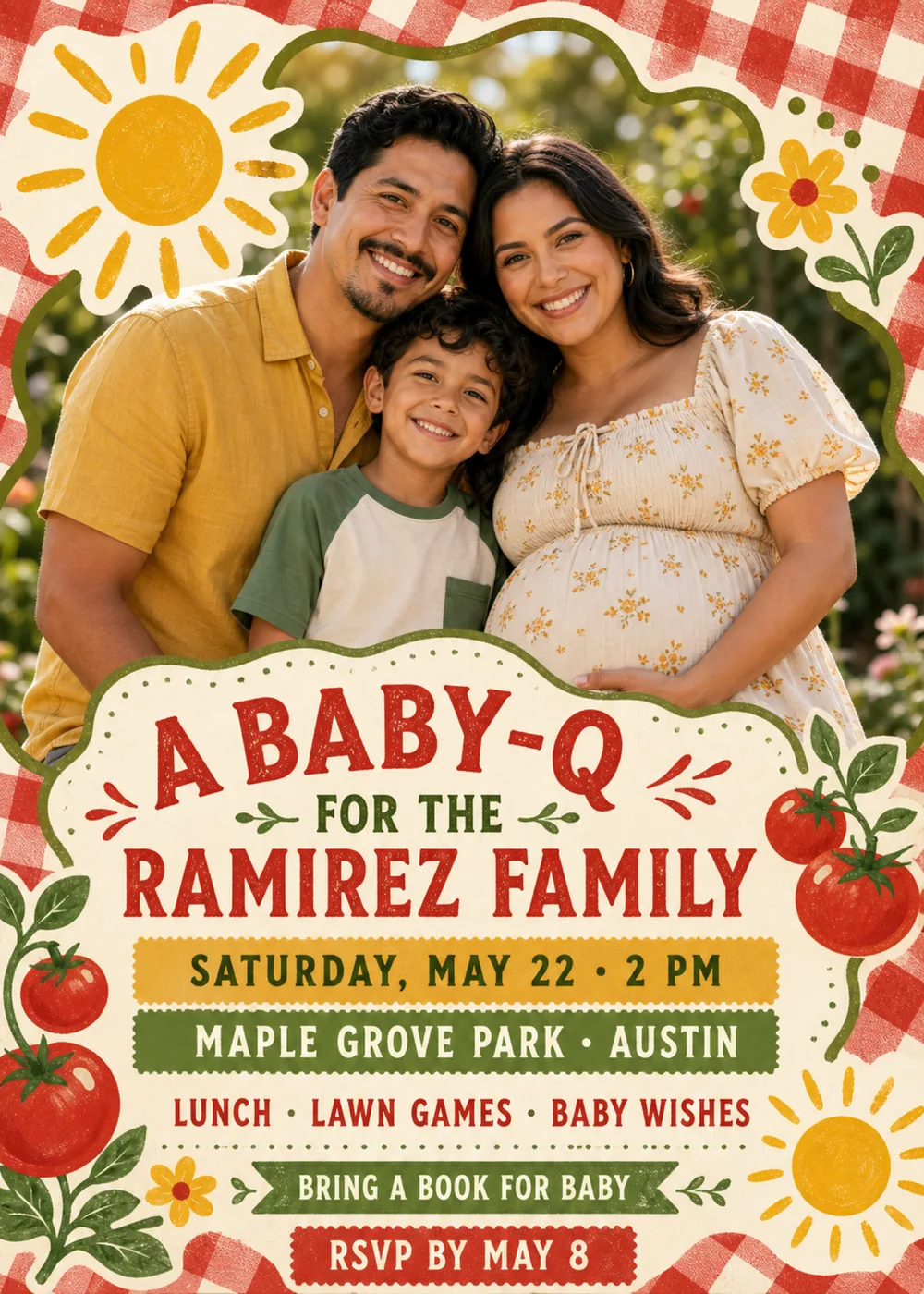
Red-and-cream gingham runs around every edge of the card like a picnic tablecloth, and a wavy, cloud-shaped window outlined in olive green fills more than half of it. In the sample the window shows a family of three outdoors in a sunny garden, heads close together and smiling: a man in a mustard-yellow shirt, a young boy in a cream T-shirt with green sleeves, and an expectant mother in a cream dress with a small yellow floral print, one hand resting on her bump. A big yellow sun on a cream patch sits at the window's top-left corner, a yellow flower with a red center on a leafy stem at the top right, and the lower edge of the photo disappears behind a cream panel with a wavy olive border and a dotted inner line, which holds all of the wording. Tomatoes on the vine frame both sides of that panel, with a small yellow flower at the lower left and a second sun at the lower right.
Everything around the photo looks hand-printed, as if stamped onto a picnic napkin: the gingham is slightly faded and uneven, the suns and flowers have a mottled, chalky ink texture, and the tomatoes are drawn flat with a glossy highlight on each. The snapshot is the only lifelike element, a warm, backlit outdoor photo with soft green foliage behind the family. Tomato red and gingham red carry most of the card, sunflower yellow and olive green trade places on the bands and leaves, and warm cream holds it all together, while the sample family's mustard, cream and green clothes pick up the same colors, so the whole card feels like a sunny cookout on a blanket in the park. The family is fictional: your version shows a generated likeness of the people in your photo inside the window, with the gingham, suns and lettering kept around them, and the matching pieces carry the picnic artwork without any portrait.
“A Baby-Q” is the biggest line, in chunky tomato-red slab-serif capitals with a worn, speckled print texture and little red dash bursts on either side. “For the” follows in small olive capitals between two tiny leafy sprigs, then “Ramirez Family” in the same red slab capitals, nearly as large. The details are bold sans-serif capitals, each on its own strip: “Saturday, May 22 · 2 PM” in olive on a mustard band with pinked edges, “Maple Grove Park · Austin” in cream on an olive band, and “Lunch · Lawn games · Baby wishes” in red straight on the cream, above a dotted rule. “Bring a book for baby” sits in cream on an olive ribbon with notched ends, and “RSVP by May 8” closes the card in cream on a red pinked band.
A Baby-Q
for the Okafor family
Saturday, June 12 · 1 PM
Willow Creek Park · Tulsa
Burgers · cornhole · baby wishes
RSVP by May 29
Grill, chill & welcome baby
A Baby-Q for Jess & Marco
Sunday, July 18 · 3 PM
The Delgado backyard · San Antonio
Bring a favorite storybook for baby
RSVP by July 4
Big brother is ready
A Baby-Q for the Nguyen family
Saturday, May 15 · 11 AM
Cedar Hollow Park · Raleigh
Lunch · lawn games · diaper raffle
Every piece below was made in this design with Inviti. Matching pieces are a Pro feature, and each one you request is a separate generation, so yours will follow this direction without being pixel-identical.


It will follow this design's direction: a generated likeness of your family, drawn from your photo, in a wavy olive-outlined window framed by red-and-cream gingham, hand-printed suns, a yellow flower and tomatoes on the vine, with tomato-red slab-serif lettering and the details on yellow, olive and red bands. Because Inviti generates each invitation with AI from your details, the arrangement and lettering can differ from this sample.
Yes, up to six people. This design needs one personal photo of your family, and Inviti AI can't make it without one. The family of three in the sample is fictional: Inviti AI redraws the window with the people from your photo in their place, aiming to keep each person's recognizable features, hair and expression, while the gingham, suns, layout and wording stay as they are. The result is a generated likeness rather than your snapshot pasted into the frame, and it shows at most six faces, so pick one clear, well-lit photo of just your family, whether that's the parents-to-be alone or with the kids, with nobody else in it. Check every face and read every line of wording before you share, and ask for a change if something isn't right. The matching pieces are graphics only, without the portrait.
It's a common baby shower request: instead of a card, each guest brings a children's book, often with a note written inside the cover, to start the baby's library. On the sample it sits on the olive ribbon near the bottom, but it is only sample wording, like “Lunch · Lawn games · Baby wishes” above it. Add your own request and plans with your details, or leave them out, and check those lines in the version Inviti generates. Maple Grove Park in Austin is just the sample's venue; a backyard, a park pavilion or a community garden works just as well.
Yes. The invitation is designed at 5×7 inches, and the app's print preparation can lay out copies on A4 or US Letter with crop marks. For the sharpest print, generate at full resolution rather than the introductory 1K size.
With Pro you can request matching pieces such as a “Picnic menu” card, a “Welcome” sign with “A Baby-Q” and the date, a milestone sign with “A Baby-Q” and the family name, a “Cards & gifts” sign, a “Please sign our guest book” sign, a “Wishes for baby” sign, an “A Baby-Q” cake topper, “Baby-Q” cupcake toppers, “Baby-Q” banner flags with an empty photo opening, food labels such as “Strawberry shortcake”, water bottle labels with the date, “A sweet thank you” chocolate bar labels, and “Thank you” cards and tags with the family name, all drawn as graphics without the portrait. Each piece is a separate generation; the full sample set is shown below.

New subscribers start with an introductory week or month that includes five designs; plans and one-time packs show Apple-localized prices in the app.