
Class of
Class of 2027
Celebrate Marcus
Saturday, June 5 · 6 PM
The Grange Hall at Mill Creek
Dinner, music & toasts
RSVP by May 22
Navy, royal-blue and gold pennants, gold laurels and a star-topped shield around a rounded portrait frame — a varsity-style graduation party invitation that spotlights a likeness of the graduate, drawn from one photo, above their name in big gold block letters.
Make yours in the Inviti AI app for iPhone.

Point your iPhone camera at the code, then tap the link to open Inviti AI in the App Store.
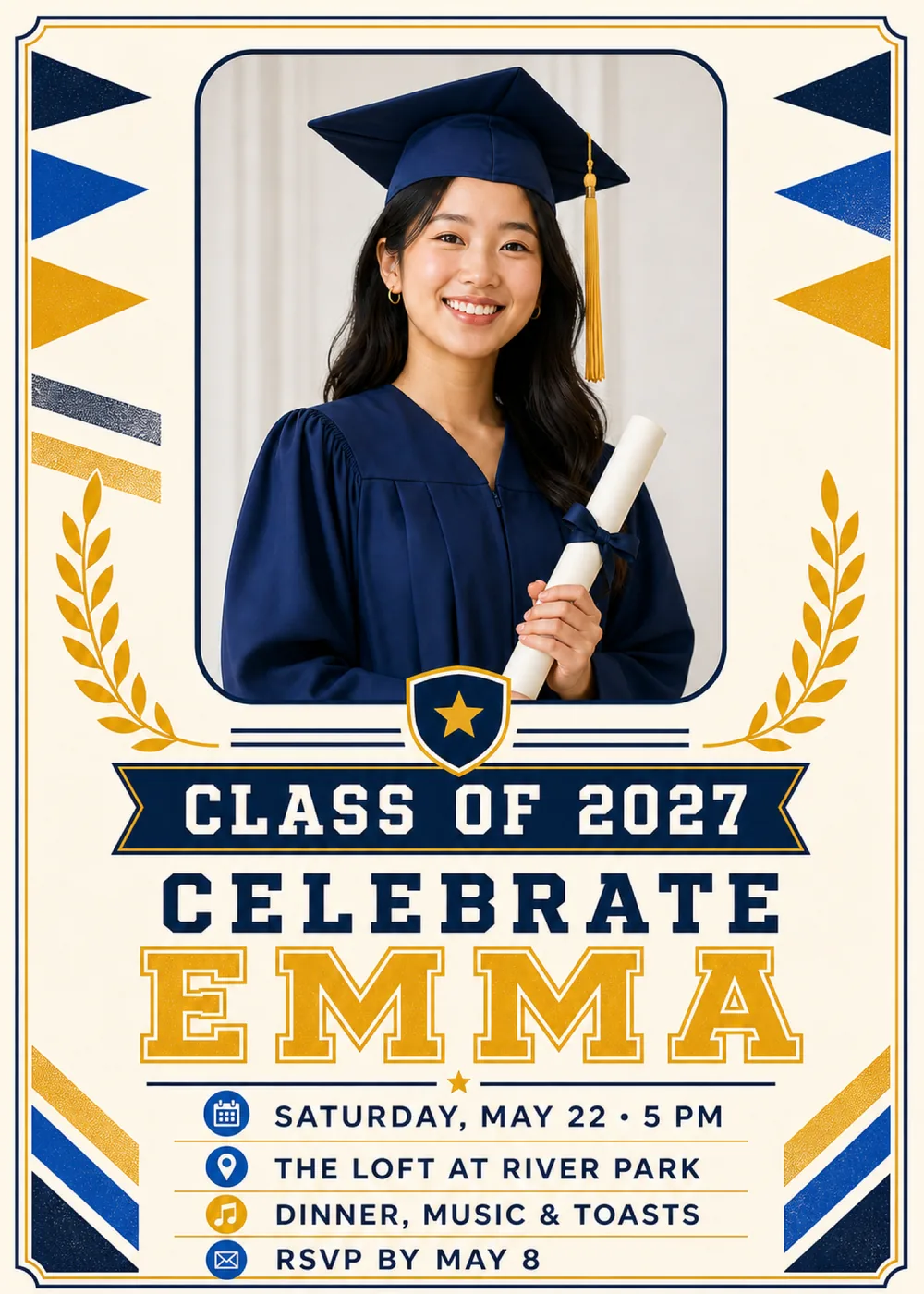
A rounded frame outlined in navy fills the upper half of the ivory card, and in the sample a graduate stands inside it against a pale curtain, smiling at the camera in a navy cap and gown, with a gold tassel hanging at one side and a rolled diploma tied with a navy bow held at the chest. Pennants point in toward the frame from both edges, a navy, a royal-blue and a gold one stacked down each side, and on the left two short speckled stripes, one navy and one gold, slant beneath them. Gold laurel branches curve up beside the lower half of the frame, and a navy shield with a gold rim and a gold star overlaps the bottom edge of the photo, set between double navy rules. Under the shield a navy ribbon banner with notched ends stretches across the card, the name and party details follow on open ivory, and diagonal stripes of gold, royal blue and navy cut across both bottom corners. A fine double border, navy outside and gold inside, steps inward at each corner like the edge of a certificate.
Everything except the portrait is flat and graphic, with crisp edges and a light speckled grain on the pennants and stripes, as if they had been screen-printed, so the card has the proud, slightly old-school feel of a school pennant hung beside a commencement program. The portrait is the one photographic element, lit softly and evenly against the pale backdrop. Navy carries the frame, the border, the shield, the ribbon and most of the lettering; royal blue turns up in the pennants, the corner stripes and the round icons beside the details; and gold runs through the pennants, laurels, star and name, with plenty of open ivory keeping the card bright. In the sample the navy cap and gown are nearly the color of the frame and the gold tassel picks up the laurels, so the graduate looks like part of the design. The graduate shown is fictional: your version shows a generated likeness of the graduate from your photo in that frame, with a single face on the card, and the matching pieces are drawn in the same varsity style without any portrait.
“Class of 2027” is set in white block capitals with squared slab serifs on the navy ribbon, which has a thin gold edge. “Celebrate” follows in widely spaced navy slab capitals, and then “Emma” takes over in the largest letters on the card: gold collegiate block capitals outlined in navy, like the letters sewn onto a letterman jacket. A navy rule with a small gold star at its center leads into the details, set in clean navy sans-serif capitals on lines separated by hairline gold rules, each with a small round icon at its left: a calendar beside “Saturday, May 22 · 5 PM”, a map pin beside “The Loft at River Park”, a gold music note beside “Dinner, music & toasts” and an envelope beside “RSVP by May 8” at the foot of the card.
Class of 2027
Celebrate Marcus
Saturday, June 5 · 6 PM
The Grange Hall at Mill Creek
Dinner, music & toasts
RSVP by May 22
Class of 2027
Come celebrate Sofia
Sunday, June 13 · 1–5 PM
The Alvarez home · Tucson
Tacos, cake & yard games
RSVP by June 1
Diploma in hand
Celebrate Jordan
Friday, May 14 · 7 PM
The Lantern Room · Columbus
Dinner, dessert & a few speeches
RSVP by April 30
Every piece below was made in this design with Inviti. Matching pieces are a Pro feature, and each one you request is a separate generation, so yours will follow this direction without being pixel-identical.


It will follow this design's direction: a generated likeness of the graduate in a rounded navy frame, navy, royal-blue and gold pennants down both sides, gold laurel branches, a navy shield with a gold star, your class year on a navy ribbon banner, and the name in big gold varsity letters on ivory paper. Because Inviti generates each invitation with AI from your details, the arrangement and lettering can differ from this sample.
One clear, well-lit photo of the graduate with nobody else in it. This design requires a personal photo, and Inviti AI won't generate it without one. The graduate in the sample is fictional: Inviti AI redraws the rounded frame with the person from your photo in that place, aiming to keep their recognizable features, hair and expression, and keeps the pennants, laurels, shield, layout and wording around it. The portrait is a generated likeness rather than your photo dropped into the frame, and it shows only one face, so pick a picture without classmates, friends or family in it rather than a group shot from the ceremony. A senior portrait or a cap-and-gown photo from graduation day suits the frame, and an everyday photo works too as long as the face is clear. Check the face and every line of wording before you share it, and ask for a change if something looks off. The matching pieces are graphics only, without the portrait.
Enter your own class year with your details; 2027 is only the sample's. Nothing on the card names a school, a degree or a grade level, and the shield carries a plain gold star rather than a crest, so the design works for high school, college or a graduate program. “Celebrate Emma”, The Loft at River Park and “Dinner, music & toasts” are sample lines too, so add your graduate's name, your venue and your own plans, then check the year and every detail in the version Inviti generates. Several of the sample's matching pieces repeat the class year, among them the cake topper, the cupcake toppers and the welcome sign, so check it on each piece you request as well.
Yes. The invitation is designed at 5×7 inches, and the app's print preparation can lay out copies on A4 or US Letter with crop marks. For the sharpest print, generate at full resolution rather than the introductory 1K size.
With Pro you can request matching pieces such as a “Welcome” sign with the class year and date, a milestone sign with the class year and the graduate's name, a “Graduation menu” card (the sample lists garden salad, roasted vegetables, lemon chicken and celebration cake), a “Cards & gifts” sign, a “Please sign our guest book” sign, a “Wishes for” sign with the graduate's name, a “Class of 2027” cake topper, “2027” cupcake toppers, a “2027” banner flag with an empty photo opening, food labels such as “Celebration cake”, water bottle labels with the class year and date, “A sweet thank you” chocolate bar labels, and “Thank you” cards and tags with the graduate's name, all drawn as graphics without the portrait. Each piece is a separate generation; the full sample set is shown below.

New subscribers start with an introductory week or month that includes five designs; plans and one-time packs show Apple-localized prices in the app.