
Make some magic
Make some magic
Juniper turns 7
Saturday, April 18 · 10 AM
Brushwork Studio · Portland
Painting & pizza
Hand-painted capitals on torn cream paper, bright brush swipes and a jar of brushes around a ragged-edged portrait window — a painting-party invitation with your own child, drawn from your photo, in the frame.
Make yours in the Inviti AI app for iPhone.

Point your iPhone camera at the code, then tap the link to open Inviti AI in the App Store.
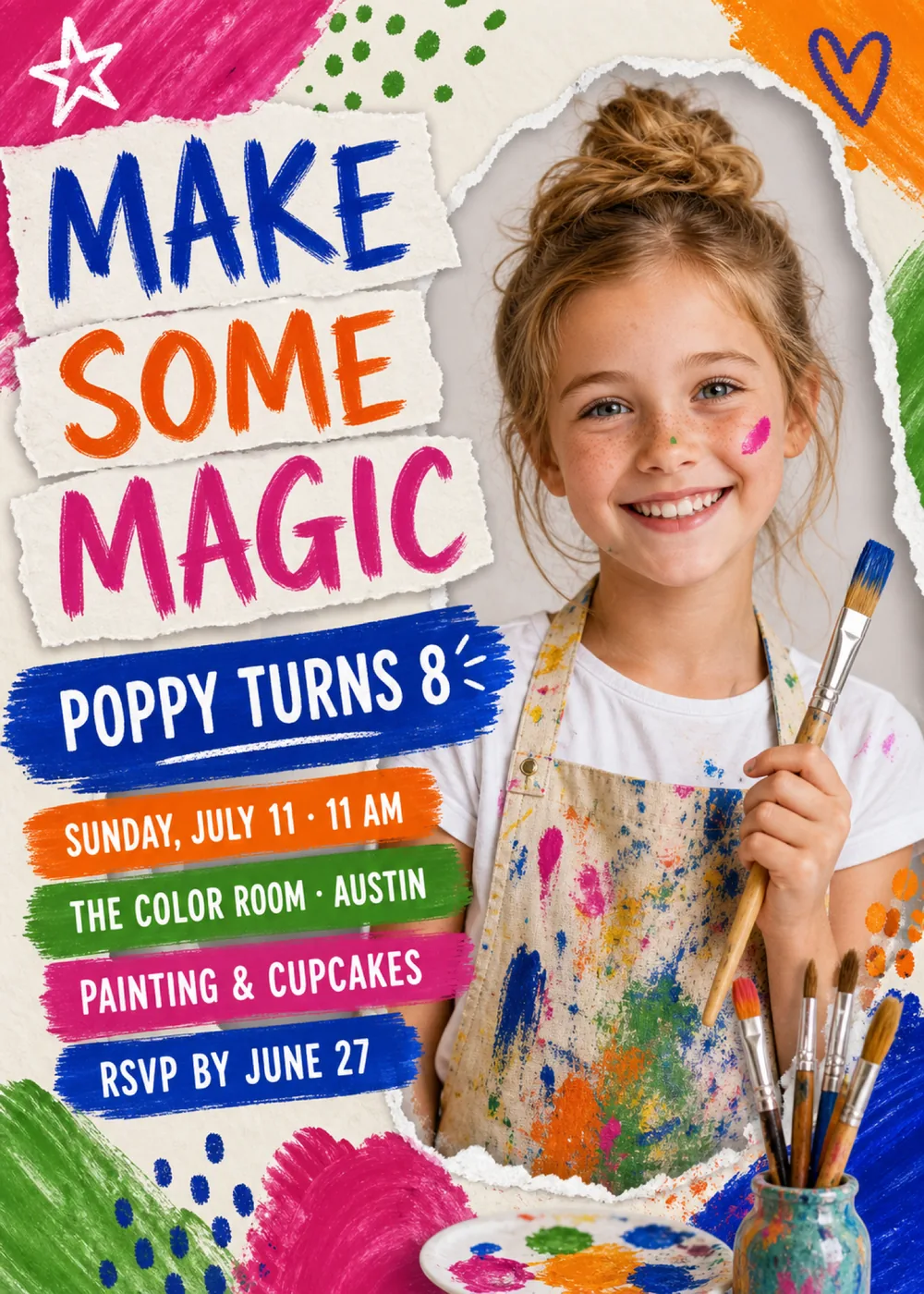
The card is split into two sides. On the left, the headline is torn into strips of cream paper, one word on each, layered at slight angles, and beneath them a column of rough brushstroke bars in cobalt, orange, green and hot pink carries the name and every party detail. On the right, a window with a ragged white torn edge opens onto the sample portrait, a smiling child in a white T-shirt and a paint-splattered apron holding up a paintbrush. Paint fills the margins: a hot-pink swipe with a white outline star in the top left corner, green dots across the top, an orange swipe with a cobalt outline heart in the top right, green, cobalt and pink strokes with scattered dots along the bottom, and, overlapping the lower edge of the window, a round palette dabbed with paint and a speckled jar crowded with brushes.
The style is an art-room collage: cream paper with soft, fibrous torn edges, dry-brush strokes that streak and feather out at the ends, and dabbed dots, all on a lightly speckled cream ground. Hot pink, orange, cobalt and grass green go on at full strength and turn up everywhere, in the headline, the bars, the corner swipes, the palette and the splatters on the apron, so the card feels like the cheerful mess at the end of a good art class. Against all that flat paint, the portrait has the soft light and natural detail of a candid snapshot, which is where the name comes from. The child shown is a fictional sample: Inviti AI redraws that spot with a likeness of the person in the photo you add, and keeps the torn paper and paint around them.
“Make Some Magic” is brushed in chunky, dry-edged capitals, “Make” in cobalt, “Some” in orange and “Magic” in hot pink, each word on its own scrap. “Poppy Turns 8” follows in white hand-lettered capitals on a cobalt stroke, with a thin white swoosh underneath and a few short spark lines flicking out beside the number. The details continue in the same white lettering, one line per bar like a stack of paint swatches: “Sunday, July 11 · 11 AM” on orange, “The Color Room · Austin” on green, “Painting & Cupcakes” on hot pink and “RSVP by June 27” on cobalt.
Make some magic
Juniper turns 7
Saturday, April 18 · 10 AM
Brushwork Studio · Portland
Painting & pizza
Come get messy
Theo turns 6
Sunday, May 3 · 2–4 PM
The Okafor backyard · 41 Linden Lane
Wear clothes you can paint in
Little artists wanted
Ivy turns 9
Saturday, October 10 · 11 AM
Maple Street Art Center · Columbus
RSVP by September 30
Every piece below was made in this design with Inviti. Matching pieces are a Pro feature, and each one you request is a separate generation, so yours will follow this direction without being pixel-identical.


It will follow this design's direction: hand-painted capitals on torn cream-paper strips, the name and details on bright brushstroke bars, and a ragged-edged portrait window with your child's likeness, framed by hot-pink, orange, cobalt and green paint swipes, a palette and a jar of brushes. Because Inviti generates each invitation with AI from your details, the arrangement and lettering can differ from this sample.
One clear, well-lit photo of your child on their own; this design won't generate without it. The child in the sample is made up, and Inviti AI draws a new likeness of the person in your photo into the torn-paper window, aiming to keep their recognizable features, hair and expression, while the layout and your wording stay in place. It isn't your photo pasted in, and the design shows only one face, so pick a picture where your child is the only person. Check the face and every line of text before you share, and ask for a change if something looks off. The matching pieces are paint-and-lettering designs without the portrait.
Neither. Eight appears only in the name line, and The Color Room is only the sample's venue; the paint, brushes and palette set a creative mood without naming a place or an age. Enter your child's age and your own spot, whether that's a kitchen table covered in craft paper, a backyard easel setup or a community art room, along with what's planned, and proofread the generated details before sharing.
Yes. The invitation is designed at 5×7 inches, and the app's print preparation can lay out copies on A4 or US Letter with crop marks. For the sharpest print, generate at full resolution rather than the introductory 1K size.
With Pro you can request matching pieces such as a welcome sign that repeats “Make some magic” with the name and venue, a “Party menu” card, a “Let's celebrate” sign, a milestone sign with the name, date, time and venue, a cards and gifts sign, a “Wishes for” sign asking guests to write a note for the years ahead, a cake topper with the name and age, initial cupcake toppers, letter pennants with an empty photo opening, food labels, water bottle labels, “Make some magic” chocolate bar labels, thank-you cards with the name and “Thank you for celebrating” tags. Each piece is a separate generation; the full sample set is shown below.

New subscribers start with an introductory week or month that includes five designs; plans and one-time packs show Apple-localized prices in the app.