
Baby in bloom
Baby in bloom
Honoring Elena
Saturday, April 25 · 10:30 AM
The Glass Conservatory · Raleigh
Brunch & lawn games
RSVP by April 10
Watercolor cosmos in peach, white and butter yellow climbing both edges of an ivory card — a “baby in bloom” shower invitation that frames a likeness of the parent-to-be, drawn from one photo, in a tall sage-lined arch.
Make yours in the Inviti AI app for iPhone.

Point your iPhone camera at the code, then tap the link to open Inviti AI in the App Store.
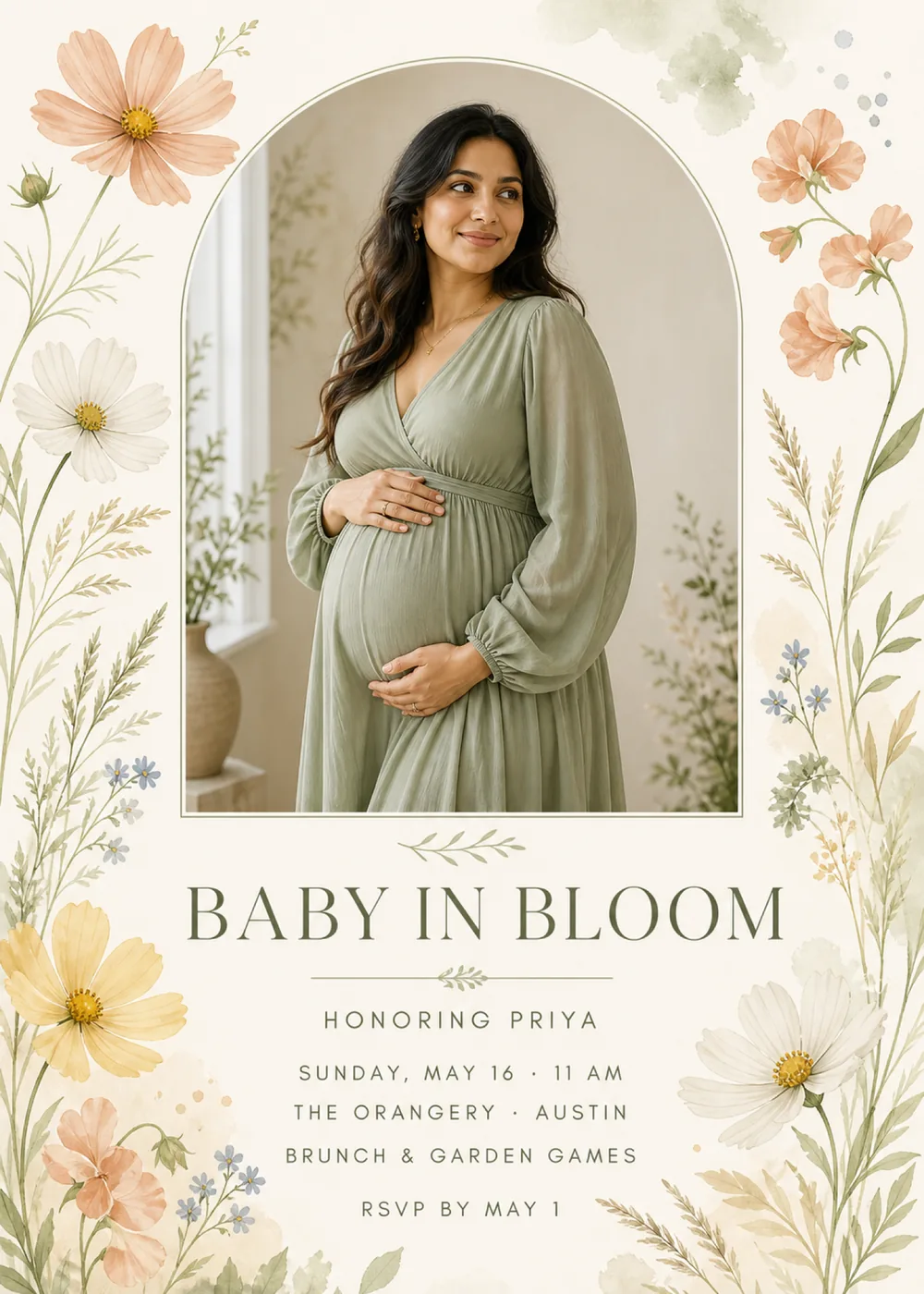
A tall arch with a rounded top and a flat base fills the upper half of the card, outlined by a fine sage line set just outside the picture. In the sample, a parent-to-be in a long-sleeved sage wrap dress stands in a softly lit room, smiling off to one side with one hand above the bump and one beneath it, while a bright window, a clay vase and a few leafy stems sit in the background. Watercolor flowers grow up both sides of the card: a large peach cosmos with a white one beneath it at the upper left, a butter-yellow cosmos and a peach bloom near the lower left, ruffled peach blossoms on curving stems at the upper right and another white cosmos low on the right, with sage leaves, wispy seed grasses and sprigs of small blue flowers threaded between them. A pale sage wash and a scatter of gray-blue dots drift across the top right corner, and a small olive leaf sprig sits under the arch to introduce the wording.
The flowers are painted in loose, translucent watercolor, with fine veining in the petals and stems drawn as thin sage lines, so the border looks brushed by hand and leaves plenty of open ivory paper. The portrait is the one photographic element, lit by soft window light in muted sage and stone, and the sage of the dress repeats the leaves and the arch line, which keeps the figure and the border in the same quiet palette of ivory, peach, butter yellow, sage and olive, with a touch of blue in the smallest flowers. Nothing on the card is bright or saturated, and it has the calm of a late-spring morning. The person pictured is fictional: your version shows a generated likeness of the parent-to-be from the photo you add, with a single face in the arch, while the matching pieces keep the flowers and lettering without any portrait.
“Baby in Bloom” is the headline, set in large olive serif capitals with gentle contrast between thick and thin strokes, and it sits between the leaf sprig above and a fine olive rule below that carries a second, smaller sprig at its center. Everything else is in airy, widely tracked sans-serif capitals in a soft gray-olive: “Honoring Priya” comes first, just under the rule, followed by a centered block of “Sunday, May 16 · 11 AM”, “The Orangery · Austin” and “Brunch & garden games”, and, after a little extra space, “RSVP by May 1” near the foot of the card between the flowers.
Baby in bloom
Honoring Elena
Saturday, April 25 · 10:30 AM
The Glass Conservatory · Raleigh
Brunch & lawn games
RSVP by April 10
A little one is blooming
Honoring Jasmine
Sunday, June 7 · 1 PM
Rosewood House · Savannah
Lunch in the garden
RSVP by May 24
Blooming again
A sprinkle honoring Leah
Sunday, May 3 · 11 AM
The Potting Shed · Portland
Tea, cake & garden games
RSVP by April 19
Every piece below was made in this design with Inviti. Matching pieces are a Pro feature, and each one you request is a separate generation, so yours will follow this direction without being pixel-identical.


It will follow this design's direction: a generated likeness of the parent-to-be inside a tall arch outlined in a fine sage line, watercolor cosmos, peach blossoms, small blue flowers and wispy grasses down both sides, “Baby in Bloom” in olive serif capitals between leaf sprigs, and the details in spaced sans-serif capitals on ivory paper. Because Inviti generates each invitation with AI from your details, the arrangement and lettering can differ from this sample.
One clear, well-lit photo of the parent-to-be with nobody else in it. This design requires it, and Inviti AI won't generate the invitation without one. The person in the sample is fictional: Inviti AI redraws the arch with the person from your photo in that place, aiming to keep their recognizable features, hair and expression, and keeps the flowers, the layout and your wording around them. The portrait is a generated likeness, not your photo dropped into the frame, and the design shows only one face, so leave partners, friends and older siblings out of the picture. A photo from a maternity session works well, and so does a casual one taken at home, as long as the face is clear. Check the face and every line of the wording before you share it, and ask for a change if something looks wrong.
Yes. “Honoring Priya” is only sample wording, set in the small spaced capitals right under the headline, so a short line such as “Honoring Maya & Sam” or “Welcoming baby Rose” fits the same spot. Keep in mind that the arch pictures one person, so a shower for both parents still shows just one of them. The Orangery in Austin and “Brunch & garden games” are the sample's venue and plans; enter your own, and read every line in the version Inviti generates before sending it.
Yes. The invitation is designed at 5×7 inches, and the app's print preparation can lay out copies on A4 or US Letter with crop marks. For the sharpest print, generate at full resolution rather than the introductory 1K size.
With Pro you can request matching pieces such as a “Welcome” sign with “Baby in bloom” and the date, a “Brunch menu” card (the sample lists fruit and yogurt, herb quiche, garden salad and lemon cake), food labels such as “Lemon cake”, water bottle labels with the date, a milestone sign with the guest of honor's name, a “Cards & gifts” sign, a “Please sign our guest book” sign, a “Wishes for baby” sign, a “Baby in bloom” cake topper, “Baby” cupcake toppers, letter banner flags with an empty photo opening, “A sweet thank you” chocolate bar labels, and thank-you cards and tags from the parent-to-be and baby, all drawn as graphics without the portrait. Each piece is a separate generation; the full sample set is shown below.

New subscribers start with an introductory week or month that includes five designs; plans and one-time packs show Apple-localized prices in the app.